US
US


ClickUp remains a strong option for teams that want maximum flexibiliy, but feature breadth is no longer enough. Teams are placing more weight on clarity, ease of adoption, and how well a platform supports the way they actually work. .
There is no single best ClickUp alternative. Magnetic connects delivery, resourcing, time, and financial date for professional services firms, while Asana, monday.com, Trello, Notion, Smartsheet, and Teamwork suit different types of work.
Pricing should be judget by more than cost per user. Setup time, configuration, ongoing maintenance, additional software, and the way costs increase as a team grows all affect long-term value.
Professional services firms need more than task management. Connecting projects with time, budgets and profitability helps teams identify overservicing, resource constraints and delivery risk earlier.
Changing platforms is also an opportunity to simplify how work is managed. Preserve the data that sill matters, remove outdated workflows, and configure the new system around how the team operates today.
ClickUp gives teams an unusually broad set of tools in one platform. That is exactly why some companies choose it, and why others eventually look for something more focused,
This guide compares seven ClickUp alternatives for different ways of working, form simple task boards, and company-wide project management to client delivery, resource planning and project profitability. Each platform is assessed using the same criteria, with current pricing, clear limitations and product screenshots.
*Public list prices shown per user or member per month on billing where available. Pricing, currencies, minimum seat rules and taxes can vary by region. Check the linked pricing page before buying.
ClickUp remains one of the broadest work management platforms available. Its free plan includes unlimited tasks, collaborative docs, kanban boards and sprint management. The unlimited plan adds Gantt charts, integrations, storage, time tracking, goals, portfolios and resource management. For teams that want one configurable workspace for many kinds of work, that is a compelling offer.
The question is not whether ClickUp has enough features. It usually does. The question is whether your team needs all of them, how much administration your workspace requires, and whether the platform reflects the way your organization operates.
Teams commonly start comparing ClickUp competitors when they want:
ClickUp is still a sensible choice if your team values breadth, is prepared to govern its workspace properly and wants tasks, docs, whiteboards, chat, time tracking, dashboards under one subscription. Changing platforms only makes sense when another product solves a material problem better.
Every platform was reviewed against the same six questions
What work was it designed to manage? A task tool for a five-person team should not be judged in the same way as as a portfolio system for enterprise PMO.
Magnetic appears first because it is the publisher's product and because it provides a useful comparison for teams that need client delivery, resourcing, time and project financials alongside project management. Readers with different priorities may find another tool in this list more suitable. The numbering makes the guide easier to follow and should not be read as a universal ranking.
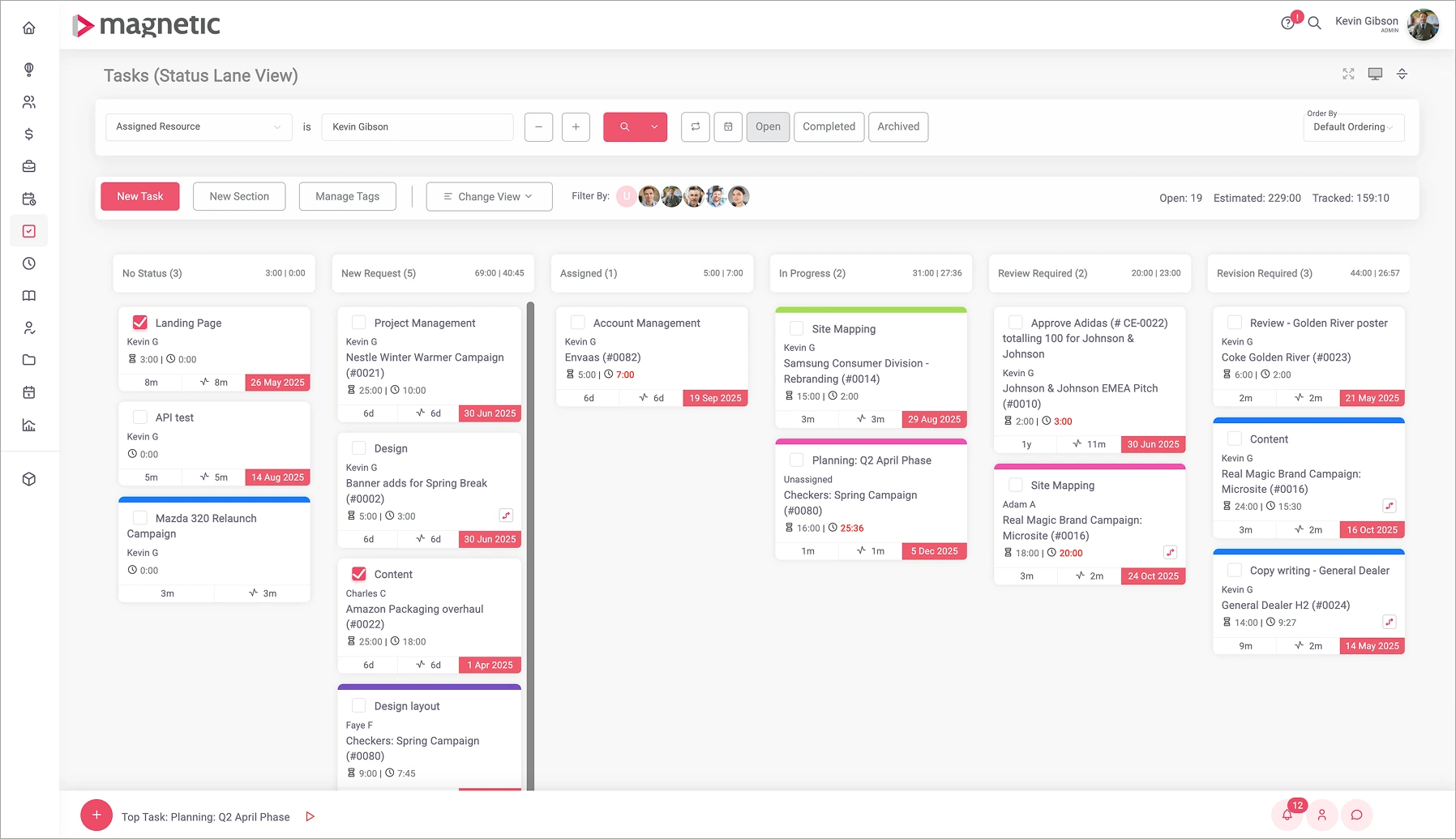
Magnetic is professional services automation built for firms that sell time and expertise. While ClickUp primarily helps teams organise and complete work, Magnetic connects the commercial side of a client engagement through to its delivery. Opportunities, projects, resource plans, timesheets, budgets, billing and profitability all work from the same data.
This makes Magnetic particularly relevant to agencies, consultancies and other project-based firms that need to understand more than whether tasks are complete. They also need to know whether the right people are available, whether the right people are available, whether the project is within budget, what can be invoices and whether the work is profitable.
Choose Magnetic when the main problem is not task management, but the lack of connection between sales, delivery, resourcing and finance.
A project can begin as an opportunity in Magnetic 's CRM, feed into the resource plan and become a live project without rebuilding the same information in separate systems. Time entries connect to project budgets and billing, while reporting shows capacity, utilisation, overservicing and profitability.
ClickUp offers time tracking, portfolios and resource management, but it remains a broad work management platform. Magnetic is designed around the way professional services firms operate and the commercial questions they need to answer:
For firms currently combining a CRM, project management tool, resource planner, time tracker and billing process, Magnetic can replace more of that operating stack with one connected platform.
Magnetic is narrower than ClickUp by design. It is not intended to replace the company wiki, whiteboard platform or software development tool. Client billing, purchases, cost estimates, over-servicing and profitability dashboards require Pro and all paid plans have a 5 user minimum. A team that only needs shared task tracking will find simpler options here.
Magnetic pricing includes a free solo plan for one user. Essentials starts at £9 per user per month on annual billing and adds CRM, pipeline, forecasting, Gantt charts, resource management, and leave management. Pro starts at £17 and adds client billing and purchases, cost estimates, over-servicing, profitability and revenue forecasting. Enterprise pricing is custom. All plans include a 14-day of pro features with no credit card required.
Asana is a strong ClickUp alternative for organisations that coordinate work across marketing, operations, product and leadership teams. It offers list, board, calendar, time and Gantt views, but its main advantage is the consistency of the underlying work model. Tasks, projects, portfolios and goals have clear roles, which make a large workspace easier to govern.
Choose Asana when you want teams to follow a shared project structure without spending as much time deciding how spaces, folders, lists and views should be configured. Multi-homing lets one task appear in more than one project while staying synchronised, which is useful when the same deliverable affects several departments.
Asana is also strong at connecting execution to higher-level planning. Its Advanced plan included portfolios, goals, resource management, approvals, proofing and time tracking, This makes it a practical option for campaign planning product launches, intake workflows and company-wide initiatives.
Asana is relatively quick to introduce because its basic structure of projects, tasks, owners, and due dates are easy to understand. Templates can shorten the initial setup, while portfolios, goals, permissions and reporting require more planning as adoption expands across departments. Teams that agree on a small set of project conventions early are less likely to create inconsistent workspaces later.
Asana can track time on the Advanced plan, but timesheets, user rates and project budgets are part of a separate timesheets and budget add-on. Firms that need billing, purchases, revenue forecasting or detailed client profitability will still need additional software or integrations. Its personal plan is also limited. to two users, so most teams will more directly to a paid tier.
Asana pricing starts with personal at $0 for up to two users. Starter costs $10.99 per user per month when billed annually, while Advanced costs $24.99 and adds portfolio's, goals, resource management, approvals, proofing and native time tracking. Enterprise plan is custom.
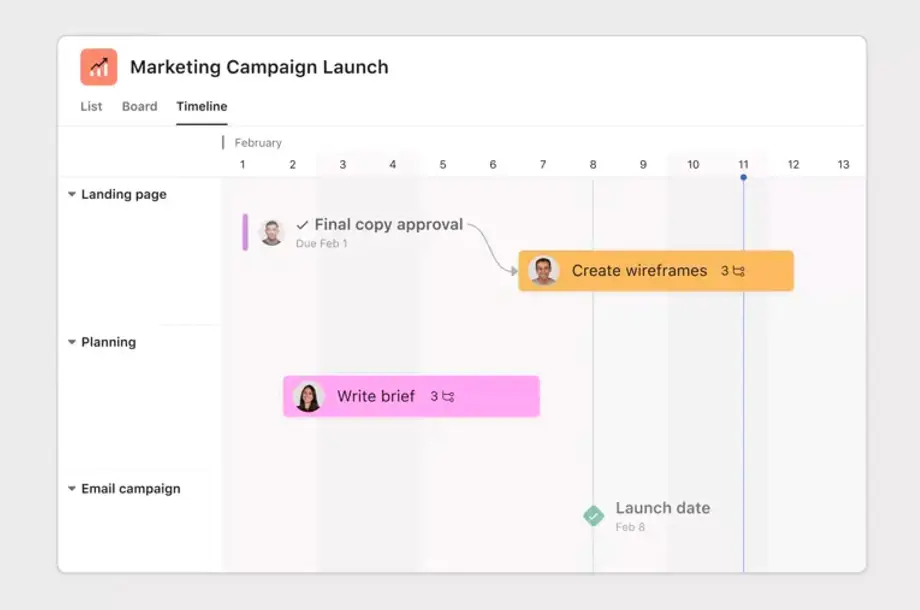
The verdict: Asana is the better choice when cross-team coordination and consistent project structure matter more than maximum configurability. ClickUp remains stronger for teams that want more capabilities bundles into a lower-priced plan.
monday.com gives teams a flexible set of boards, columns, dashboards and automations for building their own workflows. It covers much of the same ground as ClickUp, but presents work in a more visual, spreadsheet-like format that many non-technical teams find approachable.
Choose monday.com when the workspace needs to communicate status quickly. Colour-coded fields, board views and customisable dashboards make it easy to see owners, dates, dependencies and campaign or project status without opening every item.
The platform is particularly useful when departments need different workflows but leadership still wants consolidated reporting. Templates help teams get started, while forms and automations support processes such as creative requests, campaign tracking, event planning and operational approvals.
A team can create its first monday.com board quickly, especially when starting from a template. Wider adoption takes more planning because teams need to agree on board structures, columns, automations, and reporting conventions, The platform's flexibility is useful, but it can also produce inconsistent workflows if each department build its workspace independently.
The plan structure matters. Standard includes only 250 automation actions and 250 integration actions per month, Time tracking, private boards and advanced views are reserved for Pro, while portfolio management and resource management are listed on Enterprise. Teams can also end up with many boards and custom fields that require the same kind of governance they were trying to reduce in ClickUp.
monday.com pricing includes a free plan for up to two seats. In the UK pricing view, checked for this article, Basic starts at £8 per seat per month. standard at £11 and Pro at £17 on annual billing. The displayed currency and final price depend on the billing country and Enterprise pricing is custom. Check the total shown for your selected team size before comparing it with another platform.
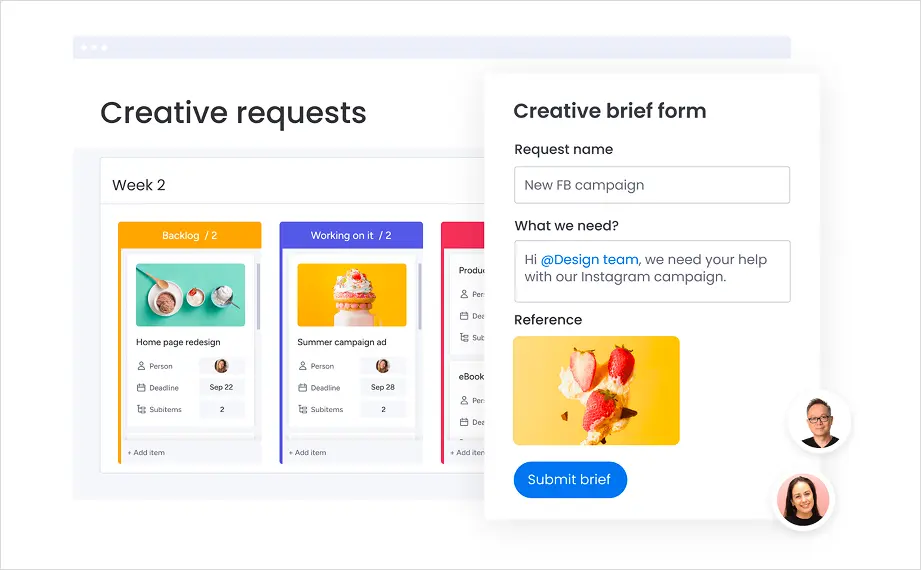
The verdict: monday.com is a strong choice for visual teams that want flexible workflows and attractive dashboards. It is not necessarily simpler than ClickUp once a company builds several custom processes, so test the planned workspace structure rather than judging a single demo board.
Trello is the most straightforward ClickUp alternative in this this. Work is organised into boards, lists, and cards, so a new user can understand the basic model within minutes. That simplicity make Trello effective for editorial calendars, personal planning, small-team task management and lightweight approval processes.
Choose Trello when ClickUp feels disproportionate to the work being managed. If the team mainly needs to see what is waiting, in progress and complete, a clear board can be more useful than a platform with many heirarchies, views and settings.
Trello is no longer limited to a basic board. Standard adds custom fields, advanced checklists, card mirroring and more automation. Premium adds calendar, timeline, table, dashboard and map views. Power-ups extend boards with third-party apps, while built-in automation can handle recurring actions and simple rules.
Trello is the quickest platform in this comparison to adopt for basic task management. Most users can understand boards, lists and cards with little training, Setup becomes more involved when teams introduce multiple boards, Power-Ups, automation and reporting requirements, so its adoption advantage is strongest when the workflow remains simple.
Trello becomes less convincing when work needs several levels of hierarchy, complex dependencies, detailed portfolio reporting or formal capacity planning, Premium adds more views, but it does not turn Trello into a full resource, budget or profitability system. A company can also accumulate separate boards that make cross-project reporting harder.
Trello Pricing starts with Free for up to ten collaborators per workspace. Standard costs $5 per user per month on annual billing, Premium costs $10 and Enterprise starts at $17.50. Premium is a relevant comparison for teams that need Timeline, Dashboard and workspace-level views.
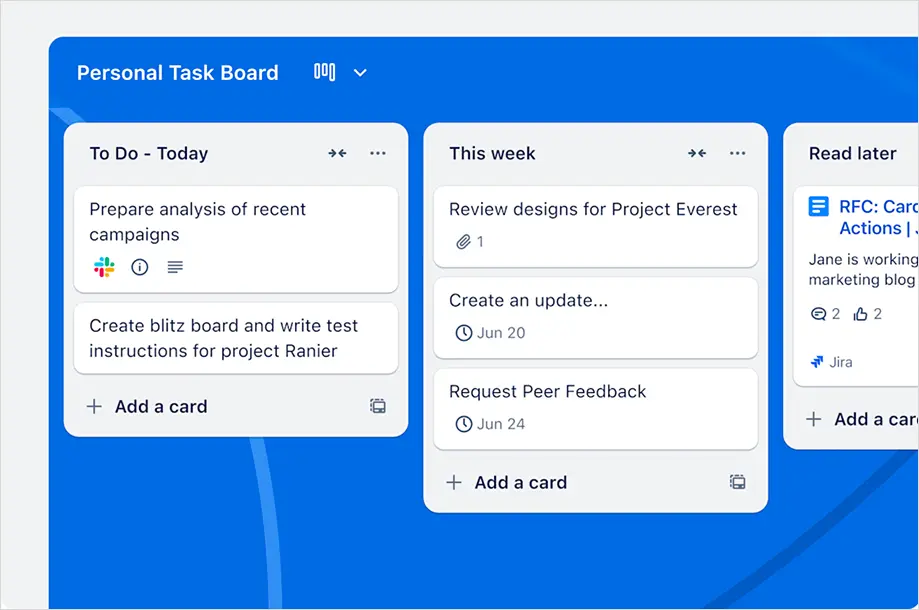
The verdict: Trello is the better option when ease of use is the priority and the workflow is genuinely simple. It is not a direct replacement for the broader planning, reporting and resource features available in ClickUp.
Notion combines pages, databases, wikis, project views and AI tools in one workspace. It approaches work management from the document outward, making it well suited to teams that want project pans. meeting notes, research and company knowledge to sit together.
Choose Notion when written context is central to how your team works. A project can contain the brief. decisions, research, tasks, and status in the same page structure, rather than splitting documentation and execution across separate parts of the product.
Notion databases can display the same work as a table, board, calendar or timeline. Relations and rollups allow teams to connect projects, tasks, people and goals. It is especially useful for content teams, startups, product teams and organisations building an internal wiki alongside lightweight project management.
Notion is easy to start using for documents and simple databases, but a dependable company-wide workspace takes longer to design. Teams need to decide how pages and databases relate, which templates to use and who maintains the structure. Adoption is usually easier when the initial workspace is deliberately limited rather than giving each team a blank page and unlimited configuration choices.
Flexibility comes with setup work. Teams need to decide how databases relate, which properties are required and who maintains templates. Notion does not offer the same native depth for workload balancing, billable time, project budgets, invoicing or profitability. Complex project plans may also require more manual design than they would in a dedicated project management platform.
Notion pricing includes a free plan with unlimited pages and blocks for an individual, but collaborative blocks are limited when a workspace has two or more members. In the UK pricing view checked for this article, Plus costs £8.50 per member per month, and Business £16.50 on annual billing. Business adds Notion Agent, AI meeting notes, enterprise search, SAML, SSO and granular database permissions. Enterprise pricing is custom, and custom agents use a separate credit model after the trial allowance.
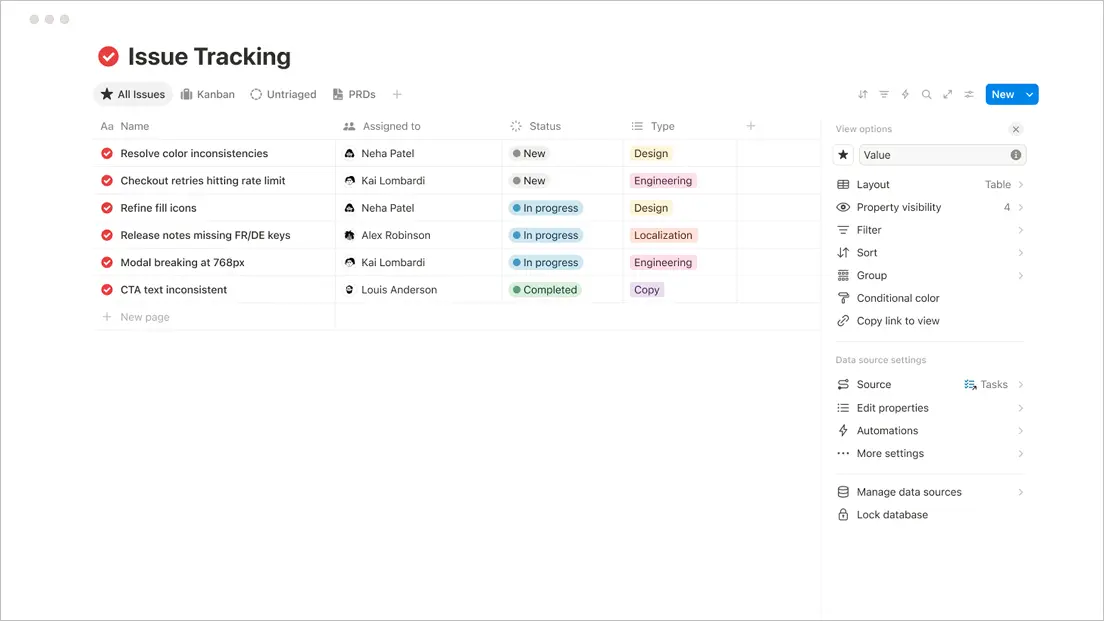
The verdict: Notion is the better alternative when the team wants knowledge and projects to share one home. ClickUp is stronger when detailed task control, resource planning and operational reporting take priority.
Smartsheet combines a familiar grid with Gantt, board, calendar and timelines views, automation, forms, reports and dashboards. It is widely suited to operations teams and PMOs that need structured planning without asking spreadsheet-oriented users to adopt a completely new way of working.
Choose Smartsheet when planning starts with rows, columns, formulas, and dependencies, but needs stronger collaboration and reporting than a conventional spreadsheet can provide. Cross-sheet reports and dashboards can consolidate information from many projects, which is valuable for programme governance and executive reporting.
Smartsheet also supports approval workflows, automated alerts and external contributors. Business includes workload tracking, while Enterprise adds scenario planning and portfolio capabilities. This gives larger organisations a route from individual project schedules to formal portfolio management.
Smartsheet will feel familiar to teams that already manage work in spreadsheets, which can reduce the initial learning curve. More advanced deployments require careful configuration. of sheets, formulas, dependencies, reports, dashboards, and permissions. PMO-led teams with defined planning standards are likely to adopt it faster than teams looking for an informal task tool.
The interface is familiar to spreadsheet users, but can feel dense for teams that prefer a lighter task experience. Workload tracking requires the Business plan, Scenario planning requires the Enterprise plan and full resource management is a premium add-on. Teams should confirm the complete package needed for capacity planning, time tracking and project budgets before comparing the bp.ase subscription with ClickUp.
Smartsheet pricing lists Pro at $9 per member per month and Business at $19 on annual billing. Business has a three-member minimum and adds workload tracking, admin capabilities, and unlimited automations. Enterprise pricing is custom and advanced resource management is sold separately.
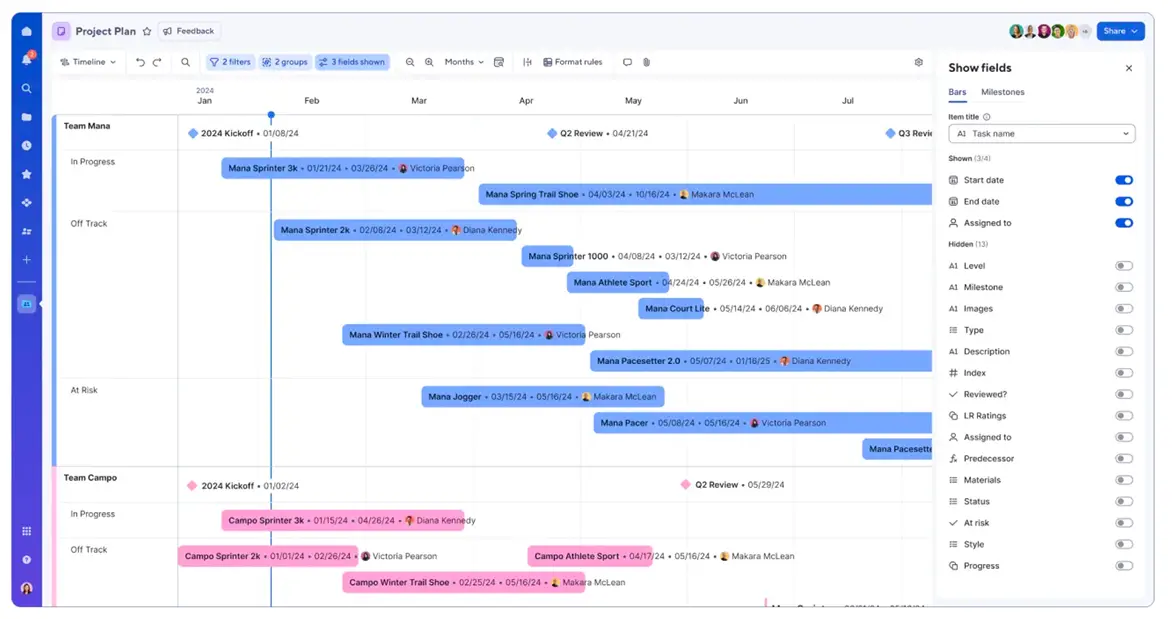
The verdict: Smartsheet is a stronger option for spreadsheet-led planning, formal PMOs and multi-project reporting. ClickUp will usually feel more natural for teams that manage tasks, conversations and documents.
Teamwork.com is designed for client-service businesses rather than general internal work. It combines project management with time tracking, client access, resource planning, budgets, cost rates and profitability reporting. This makes it one of the most direct ClickUp alternatives for agencies and consultancies.
Choose Teamwork.com when completing tasks is only part of the requirement. Client-service teams also need to know whether work is within budget, whether people have capacity and whether engagement is profitable. Teamwork.com treats those questions as part of the core cooperating model.
The platform supports Gantt, Table, List and Board views, project templates, billable time and client users. Accelerate , views, time budgets, retainers, invoicing from logged time and Quickbooks and HubSpot connections. Optimize adds tentative resource planning, role and skill-based scheduling, multi-currency budgets, and revenue, cost and profitability insights.
Teamwork.com is relatively straightforward for teams starting with client projects, tasks, and time tracking. More preparation is needed when introducing budgets, billable rates, workload planning, retainers and profitability reporting. Agencies with established delivery and financial processes should find adoption easier than teams than need to redesign those processes during implementation.
Teamwork.com is more specialised than ClickUp, which is an advantage for client delivery but less usseful for teams looking for a company wiki, whiteboards, or deep software sprint tooling. Basics covers project delivery, and billable time. Workload planning and client inviocing require Accelerate, while multi-currecy budgets and profitability insights require Optimize.
Teamwork.com pricing iincludes a free plan for up to five users and five projects. Basic costs $9.99 per user per month on annual billing and has a three-user minimum. Accelerate costs $24.99, has a five-user minimum, and adds smart forms, 20,000 automations, workload planning and capacity views. Optimize and Enterprise user custom pricing.
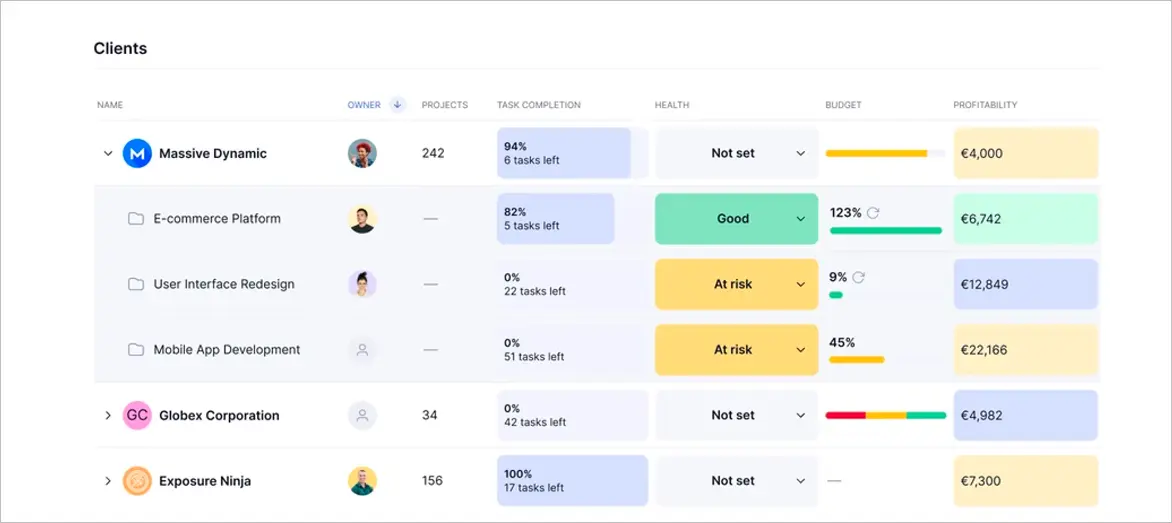
The verdict: Teamwork.com is a credible alternative for agencies that need more commercial context than ClickUp provides. General business teams that do not manage billable client work may pay for specialist capabilities they rarely use.
Start with the operating problem you need the new platform to solve.
Before committing, build the same real project in your final two options. Include one intake request, a project template, a dependency, a change in scope, a resource conflict, a time entry and the report leadership expects. A polished demo can make the platform look straightforward. A realistic test shows how much administration the team with carry each week.
A migration is not a reason to copy every field, status, and automation into a new tool. It is a chance to keep what helps and retire what no longer does.
For more on how Magnetic handles migration read our PSA software migration guide.
ClickUp combines a broad feature set with an unlimited plan listed at $7 per user per month on annual billing. The best reason to replace it is not that another platform has ore features, but rather that it fits the work more closely.
For professional services firms, Magnetic is the first option in this comparison because it connects pipeline, projects, resourcing, timesheets and finance. Teamwork.com is the closest specialist alternative, with a stronger client-project focus and commercial capabilities that expand across its higher plans. Asana, monday.com, Trello, Notion and Smartsheet each address a different part of general work management
If you run an agency, consultancy or professional services firm and want to compare ClickUp with a system built around client work, start a 14-day free Magnetic trial or book a walkthrough.
Start a free trial and see Magnetic with your own projects. No credit card required.
.svg)
The best ClickUp alternative in 2026 depends on your team's structure and workflow and the outcomes you need from a work management platform. Teams focused on cross-functional collaboration tend to select tools like Asana and monday.com, while agencies and professional service businesses tend to prefer platforms like Magnetic that connect project management with time tracking, resourcing and delivery.
Trello is the simplest option in comparison. Its board, list and card model is quick to learn and work well when a team does not need complex dependencies. , capacity planning or detailed reporting. Asana is a better step down in complexity for teams that still need formal projects, timelines and portfolios.
Magnetic is the first option to assess when an agency wants one system from opportunity and pipeline forecasting through to project delivery, resourcing, timesheets and billing. Teamwork.com is a close alternative for client projects, time, capacity and commercial reporting. The better fit depends on the plans and integrations required, so test both with a representative client engagement.
Magnetic provides project financial controls on Pro, including client billing, purchases, costs estimates, over-servicing, profitability, and revenue forecasting. Teamwork.com also supports project profitability with its fuller revenue, cost and profitability insights on optimize. Compare the complete plan cost and accounting workflow, not just the entry price.
Compare the plan that contains the features your team will use, then account for the minimum seats, paid add-ons, implementation, training and any other tools the platform will not replace. A low per-user rate can be misleading if time tracking, resource planning, client billing or reporting needs a higher tier or separate product
Check each vendors current import documentation before choosing a migration route. CSV import is common, but files, comments, relationships. custom fields and history may require separate handling. Clean and map the data before importing it, then validate a sample before moving the full workspace.

Magnetic is an all-in-one workflow management platform designed and built for professional services firms.

.svg)