Everything your firm runs on. One system. Meet the new Magnetic.
Product updates
12 mins
Everything your firm runs on. One system. Meet the new Magnetic.
The biggest release in Magnetic's history connects winning work, planning, delivery, billing, and month-end in one platform, with an AI colleague working alongside everyone in your firm.
Oops! Something went wrong while submitting the form.
Key takeaways
The new Magnetic is a complete rebuild: with a new interface, a new engine and a new standard for what project-based firms can expect from their software.
One platform from first conversation to month-end: CRM, estimates, planning, resourcing, time, expenses, purchasing, invoicing, revenue, forecasting and reporting.
An AI colleague built in: Maggie drafts projects from a brief and carries out real work across Magnetic, and you confirm every change.
True two-way Microsoft Teams and Slack integration: comments, replies, reactions, files and @mentions are the same in both places.
Finance-grade controls: work in progress, revenue recognition, locked periods, an audit log that cannot be edited and approval chains.
Built for growing groups: multi-entity and multi-currency by design, connected to Xero, QuickBooks Online, Visma e-conomic, NetSuite and Microsoft Dynamics 365 Business Central.
Enterprise foundations built in: two-factor sign-in, role-based access, your own file storage and connections to HubSpot, BambooHR, Personio and Ramp.
Project-based firms have spent years stitching together a CRM, a spreadsheet for estimates, a planning tool, a timesheet app, an expenses app, a reporting tool and an accounting package, then chasing the gaps between them. The new Magnetic closes those gaps. It is as close to a full ERP as a professional services firm can get without the general ledger, and the ledger stays in the accounting system you already trust.
Agencies, consultancies, engineering and architecture practices and every other firm that sells time and expertise will find the same idea everywhere: enter information once and let it flow through the whole life of the client relationship.

“Time and again, I have seen teams pour their energy into projects, only to find out much later whether the job was actually profitable. Usually, the numbers are scattered across different systems, so you are always playing catch-up. Magnetic has been bringing those numbers together for years, and we rebuilt it to go further. When a client changes direction halfway through a project, you do not have to wait for the dust to settle to know where you stand. You see the impact straight away, while you still have options.”

René PraestholmCEO, Magnetic
What has changed since the Magnetic you know
Projects, time, and money have always been at Magnetic’s core, and that hasn’t changed. What has changed is everything built on top of that foundation. The new Magnetic reflects years of listening to customers, expanding and refining the workflows you depend on, and taking you from the first opportunity through to month-end close.
Area
Then
Now
Sales and CRM
Companies, contacts and a kanban pipeline
Prospects, pipeline timeline, kanban totals and HubSpot sync
Estimates
Single estimates approved by email link
Approval in a branded client portal and sub-projects generated from the statement of work
Planning
Task lists, timelines and a Gantt view
A redesigned Gantt chart with critical path, baselines and one-step rescheduling
Resourcing
A team scheduler and a capacity heatmap
The Capacity view, tentative bookings and Plan vs Actual
Collaboration
Comments, and clients invited to tasks or projects
Two-way Teams and Slack, client portal and one project feed
Time and spend
Timesheets, timers, reminders and expenses
AI scanning, card imports, Ramp and three-way matching
Billing
Invoices in several currencies and billing entities
Billing plans on estimates and four billing types
Month-end
Exports, work in progress journals and closing dates
Work in progress adjustments with approval, proposed revenue recognition and an audit log that cannot be edited
Insight
Five dashboards and a report builder
Custom dashboards, pivot explorer, widget library and scheduled reports
AI
None
Maggie, an AI colleague that carries out work
1. Win the work
Relationships are where every engagement begins, and in the new Magnetic, that’s where you start too. All your companies, contacts, and opportunities are already part of the same system you’ll use to plan, deliver, and invoice, so when a deal closes, you can hit the ground running.
From prospect to approved Client
Keep prospective companies separate from approved Clients. Create opportunities for Prospects while reserving projects for approved Clients, so finance always knows who has been checked and approved.
See your pipeline on a timeline
Each opportunity holds its own value, probability, closing date, and expected duration. Magnetic lays these out on a timeline, giving you a clear picture of not just the numbers, but what’s ahead and when.
Kanban boards with live totals
Move deals from stage to stage and see your weighted and unweighted totals adjust instantly.
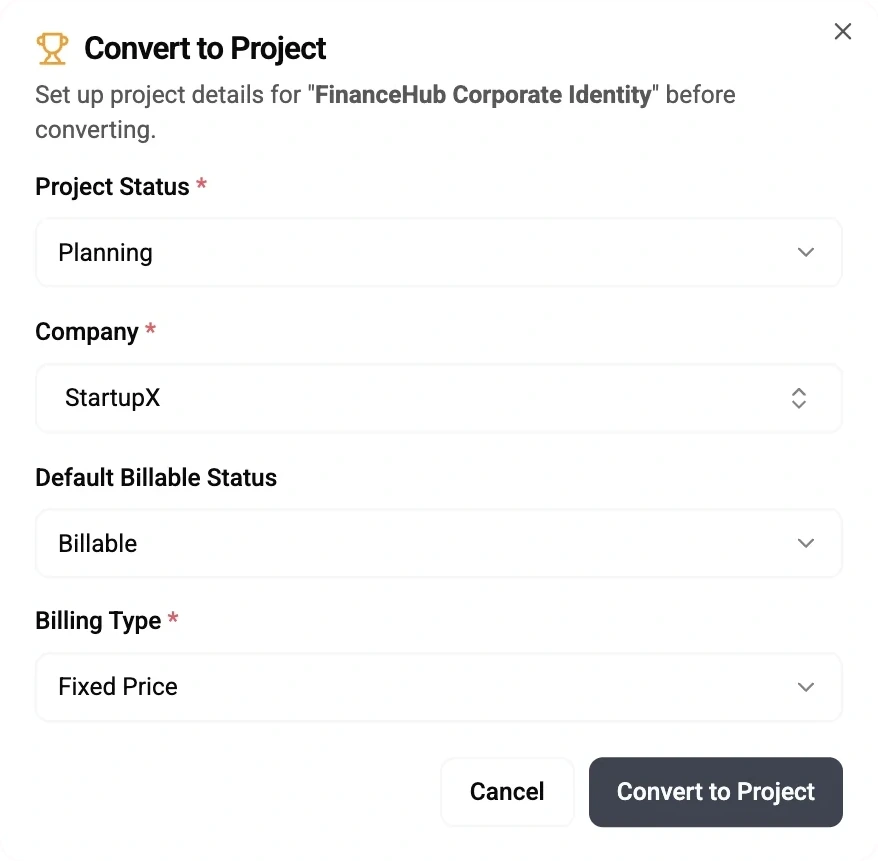
Opportunities converted to projects in one step
Converting an opportunity creates the project with the Client, budget, team and description carried over, ready for planning.
Sync with HubSpot
If your sales team lives in HubSpot, map your own portal's fields and stages and keep companies and deals in step.
Negotiation (1)
£250,000
RetailMax Holiday Campaign
RetailMax
£250,000.00
30/07/2026
OPP-006
Won (3)
£290,000 · £8,000/m
FinanceHub Corporate Identity
StartupX
£120,000.00
09/08/2026
OPP-007
TechBrand Product Video Series
TechBrand Inc
£75,000.00
05/07/2026
OPP-009
Urban Eats Marketing Campaign
Urban Eats
£95,000.00 | £8,000.00/m
10/07/2026
OPP-008
Lost (1)
£350,000
Wellness Brand Launch
GreenLife Organics
£350,000.00
15/06/2026
OPP-010
🏆 Opportunity Won!Now available as a Project.Open Project
2. Price it and sell it
Cost estimates are now a complete commercial tool. Build them from rate cards and item types – or setup your products, apply a percentage or fixed discount.
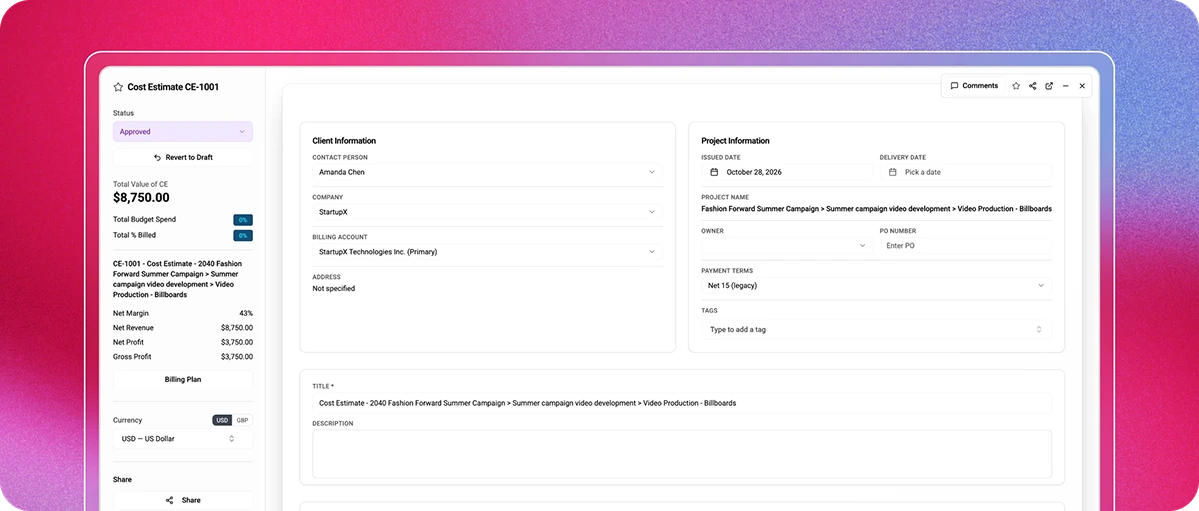
Estimates approved in the portal: share an estimate in your branded client portal, and the Client approves or rejects it there.
From statement of work to project structure: generate a master project with a sub-project for each section of an estimate, link the priced lines to them, and optionally create phases and tasks from the quantities sold.
Templates that save hours: copy estimates between projects and start new projects from templates complete with tasks, checklists and planned capacity.
Your documents, your naming: set title templates per billing entity, so every PDF, email and shared link follows your naming convention automatically.
3. Plan and resource with confidence
Planning in Magnetic now feels like using a dedicated planning tool, with every schedule anchored to the real work you've sold. Every hour you plan is directly linked to your project budgets, so what you see always reflects your commercial reality.
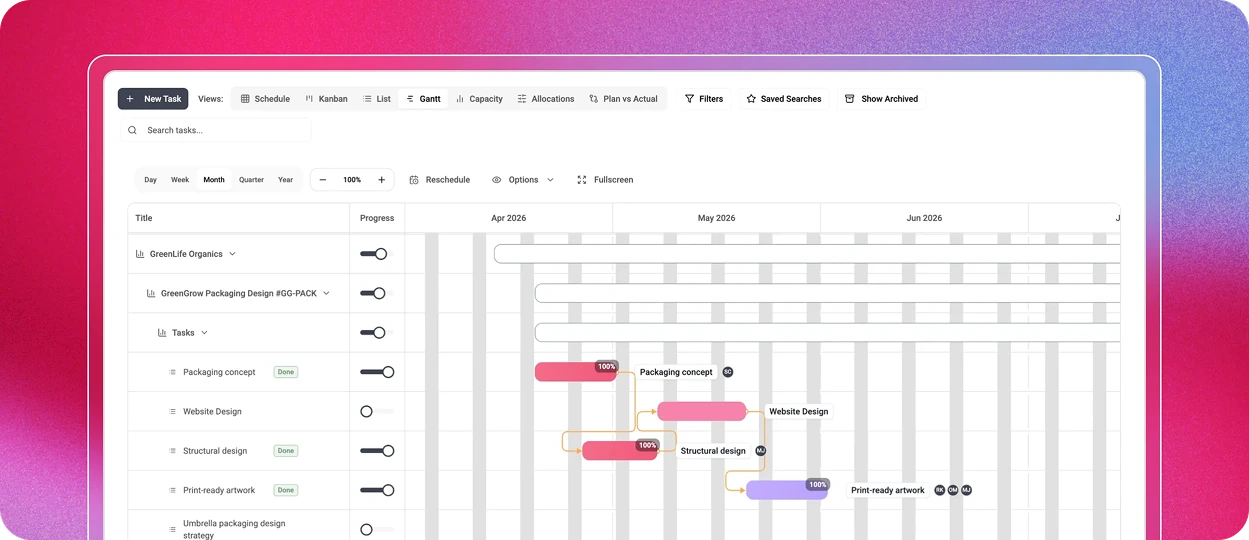
A Gantt chart built for real projects
The redesigned Gantt chart includes finish-to-start dependencies, a critical path, phases, milestones, baselining and full-screen editing. Save a locked baseline to show the Client how the plan has moved since it was agreed and export the timeline as a PNG or a branded PDF.
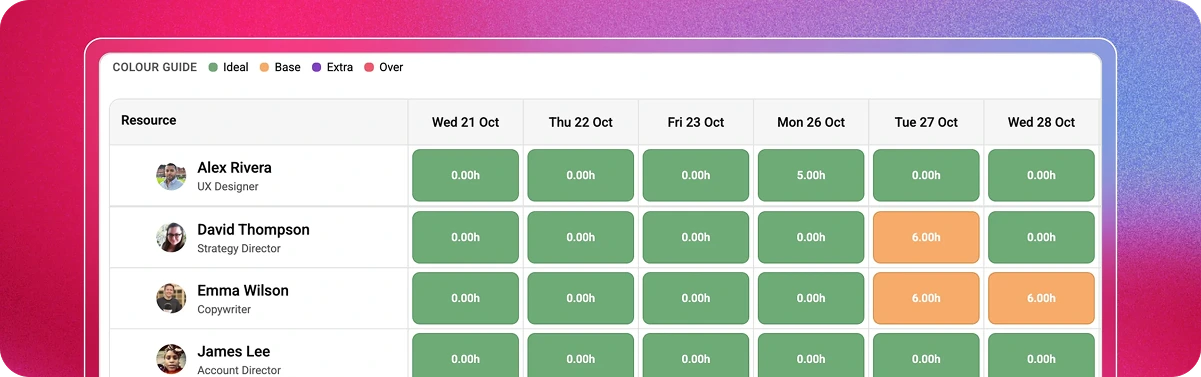
Reschedule in one step: shift an entire plan, or every project for a client, while keeping every structure and dependency intact. All timelines automatically adjust to real working days, so your schedules always make sense.
Budget vs Allocation: link tasks to estimate lines and see when planned hours exceed what was sold, before the overrun happens.
A scheduler your resource managers will love
Drag and drop work between people and days, and filter by team or department. The capacity heatmap colours every day from ideal to over, using a clear four-colour system. Tentative bookings appear with a striped design and are excluded from firm capacity counts, so you can pencil in work without losing sight of the real picture.
Capacity view: see available capacity in hours, money or percentages before you accept the rush job.
Plan vs Actual: compare planned work with logged time, find where plans keep running over and spot time logged against tasks a person was not allocated to.
Freelancers and contractors: plan people who don't need a licence or a sign-in, then convert them to licensed users later if they do.
Accurate historical records: capacity, cost, and utilisation targets are tied to their dates, so if someone moves to a four-day week, last year’s data stays exactly as it was.
4. Deliver and collaborate, wherever your team works
Work happens in conversations. The new Magnetic brings those conversations into the project, and takes the project into the places your team already talks.
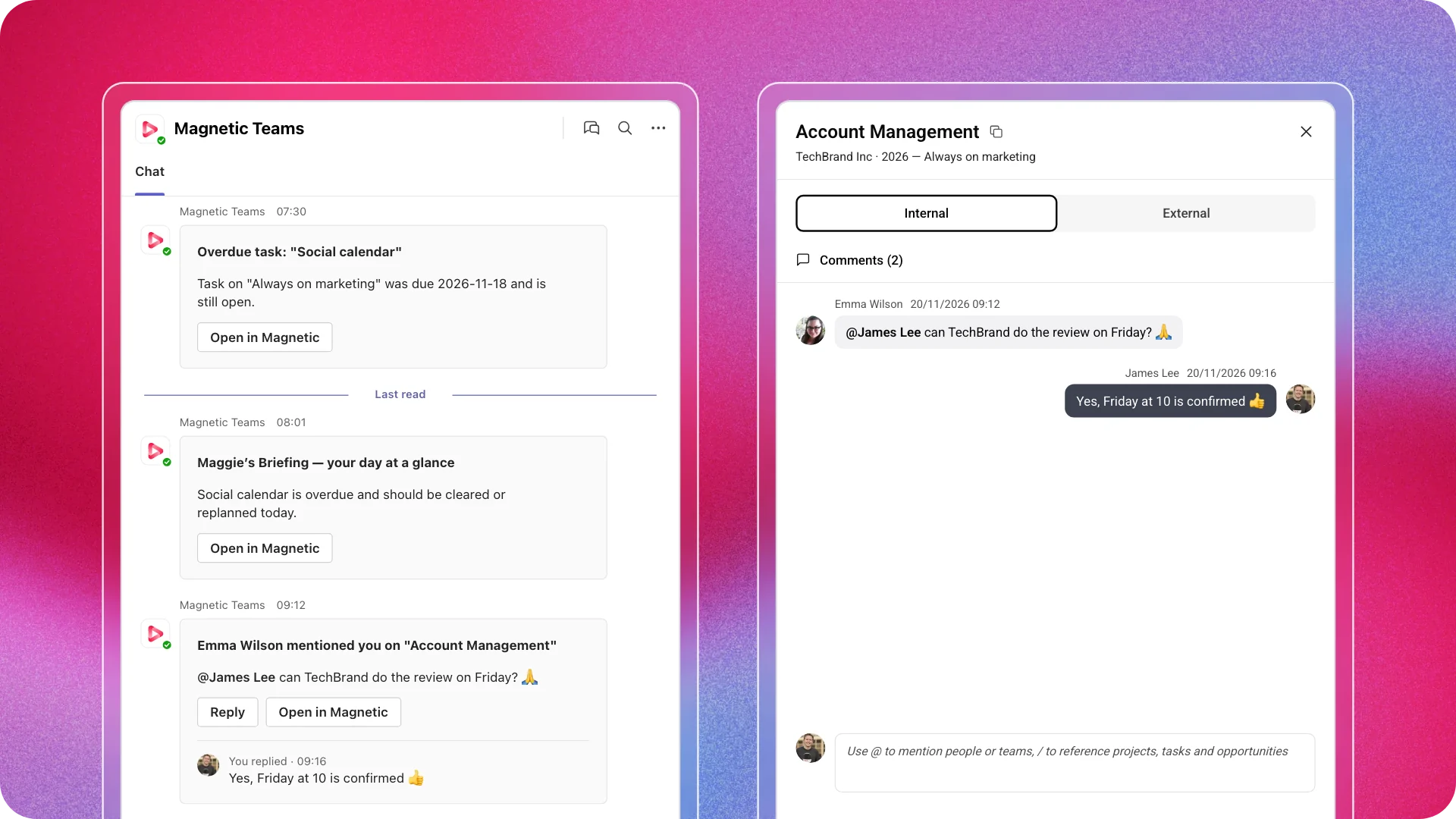
Microsoft Teams and Slack, truly two-way
Link a project to a Teams or Slack channel, or let Magnetic create a private channel with the project's Watchers as members. Add a Watcher in Magnetic, and they join the channel; the experience is the same in both directions.
Comments, replies, emoji reactions, edits and deletions sync both ways, with replies nested in the right thread.
Rich text, images, files and links survive the trip, and references to projects, tasks and files open straight into Magnetic.
@mentions stay in the project's channel, while personal alerts go to each person's own Magnetic chat.
Everything respects Magnetic permissions: a project, task or file opens only for people allowed to see it.
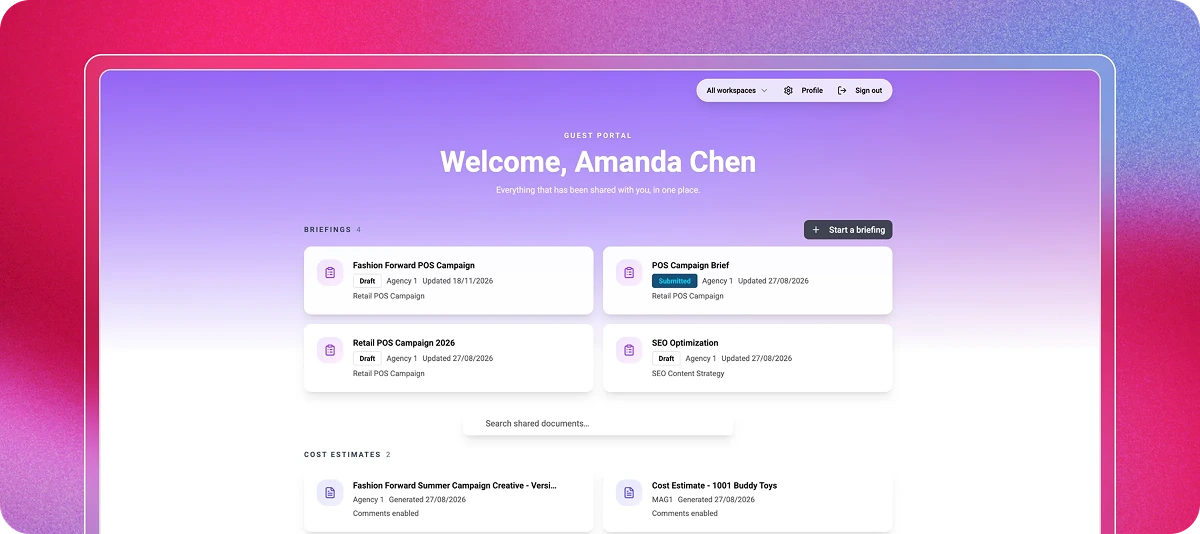
A client portal under your brand
Clients view, comment on and approve finance documents, briefs, timelines and files in a guest portal styled as your firm. Guest brief forms collect what you need up front, and live status reports give Clients a view of one or several projects.
In Magnetic's Agency Benchmarking Survey of 104 agencies (2019/20), 59% said the time it takes to get feedback was one of their biggest challenges in getting client sign-off, and 53% used email to manage and approve client work. The portal removes that bottleneck.
One feed for everything
Each project has a single activity feed combining comments, approvals and changes. Reply to comment emails straight from your inbox, @mention colleagues, and attach files. Watchers keep the right people informed.
5. Track time and expenses with less admin
Accurate numbers start with accurate capture. Magnetic makes the right thing the easy thing.
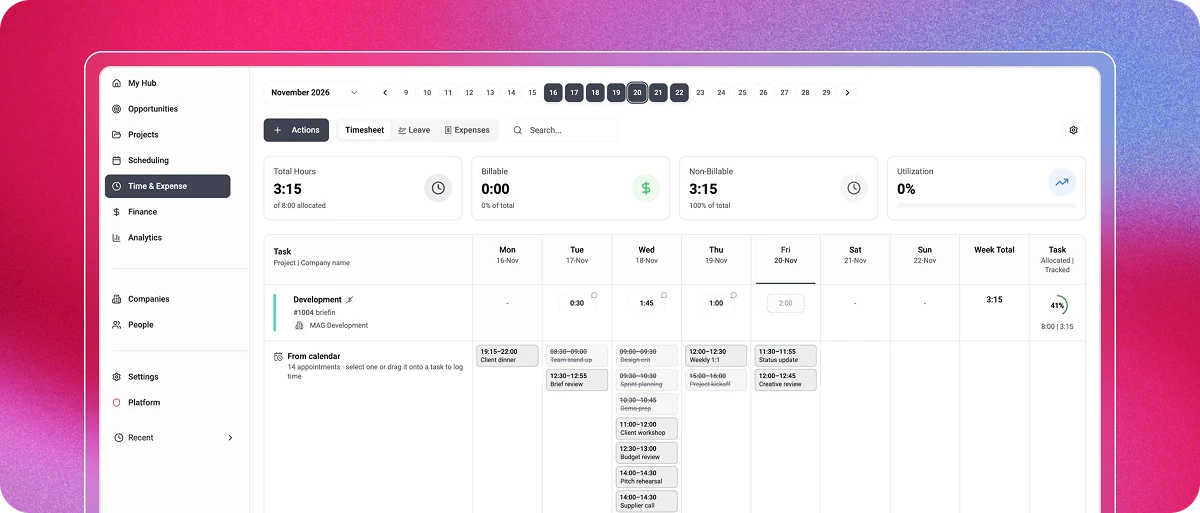
Timesheets that make sense: log time against a task so every hour lands in the right budget. A sidebar timer and Outlook calendar sync make logging quick.
Calendars that log time: drag an Outlook appointment from the Timesheet onto a task to log its time, and tasks that need a comment ask for one first. Google Calendar syncs too: its appointments show in the Timesheet and the Scheduler and reduce capacity, you choose which calendars Magnetic reads, and task bookings appear in Google as all-day events with the task's details.
Automatic reminders: scheduled reminders nudge people who miss timesheets, and managers can track compliance against each person's capacity.
Leave built in: leave requests flow through approvals and create the right non-billable entries automatically.
AI expense scanning: photograph a receipt and Magnetic reads the merchant, date and amount for you to check.
Card statements and Ramp: import statements or connect Ramp (with the Ramp Integration add-on), and Magnetic matches company-card transactions to expense claims.
Purchasing with three-way matching: raise purchase orders, scan supplier invoices in batches, and match them line by line, flagging anything outside your tolerance before payment.
6. Bill accurately and get paid faster
Invoicing is where small errors become expensive. The new Magnetic is designed so what you invoice is exactly what you agreed to.
Billing plans you set up once: each stage of an estimate carries its billing date and amount, and the revenue forecast uses them.
Fixed price, time and materials, retainer and milestone billing, each with the right behaviour.
Issued invoices stay as they were issued: stored amounts and rates are never recalculated from today's rate cards.
Credit notes and partial billing: invoice a full line, a percentage, or a set amount, and keep the rest available to bill later.
Multi-entity and multi-currency: run several billing entities, each with its own numbering, currencies and accounting connection. Every amount is held in transaction, entity and reporting currency, so totals add up in entity and reporting currency.
Share, email or download: every finance document goes out as a branded PDF or through the portal, using the same file name everywhere.
7. Close the month like a finance team, not a fire drill
This is where the new Magnetic leaves typical project tools behind. Finance teams can value work in progress, adjust it, send it for approval and post a draft journal to the accounting system for a bookkeeper to review.
Revenue recognition for each project, including milestone recognition weighted by completed phases, proposed by Magnetic and confirmed by you.
Project postings send time, invoices, purchases, and closings to your accounting system, with each record posted exactly once.
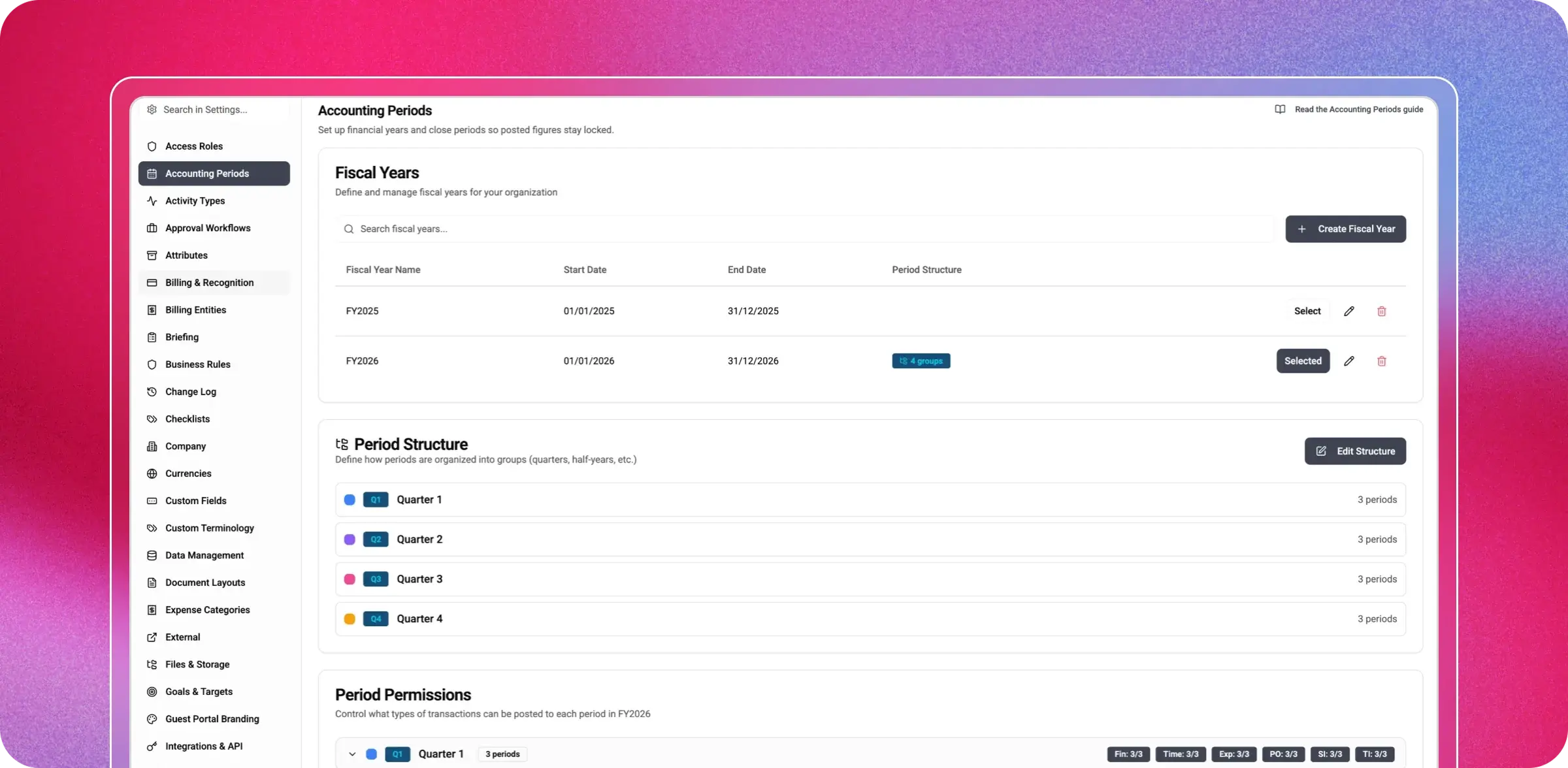
Accounting periods: lock a closed month and decide which transaction types can still be posted, from timesheets to invoices.
Compliance mode locks approved time and posted documents, and the audit log records every material change and cannot be edited or deleted.
Approval policies route timesheets, expenses, invoices, estimates, and Companies through multi-step chains, with parallel approvers and absence backups.
Connected to the systems you use: Xero, QuickBooks Online, Visma e-conomic, NetSuite and Microsoft Dynamics 365 Business Central, connected per billing entity, with payments flowing back.
Project postings, including sales invoices, are part of Finance & Billing. Revenue recognition and work-in-progress adjustments are included in the Advanced Accounting & Revenue add-on. The general ledger stays where it belongs: in your accounting system.
8. Retainers and forecasting that finance can sign off
Retainers rebuilt around the agreement
One retainer agreement can fund several projects for the same Client. It records how the retainer is charged, the period, whether unused amounts carry over and how revenue is recognised. Time, expenses, purchase orders and supplier invoices on linked projects count against it.
Every agreement shows what was bought, what has been used, what remains and a forecast for the end of the period. Retainer reports are designed to share with Clients, excluding cost and margin.
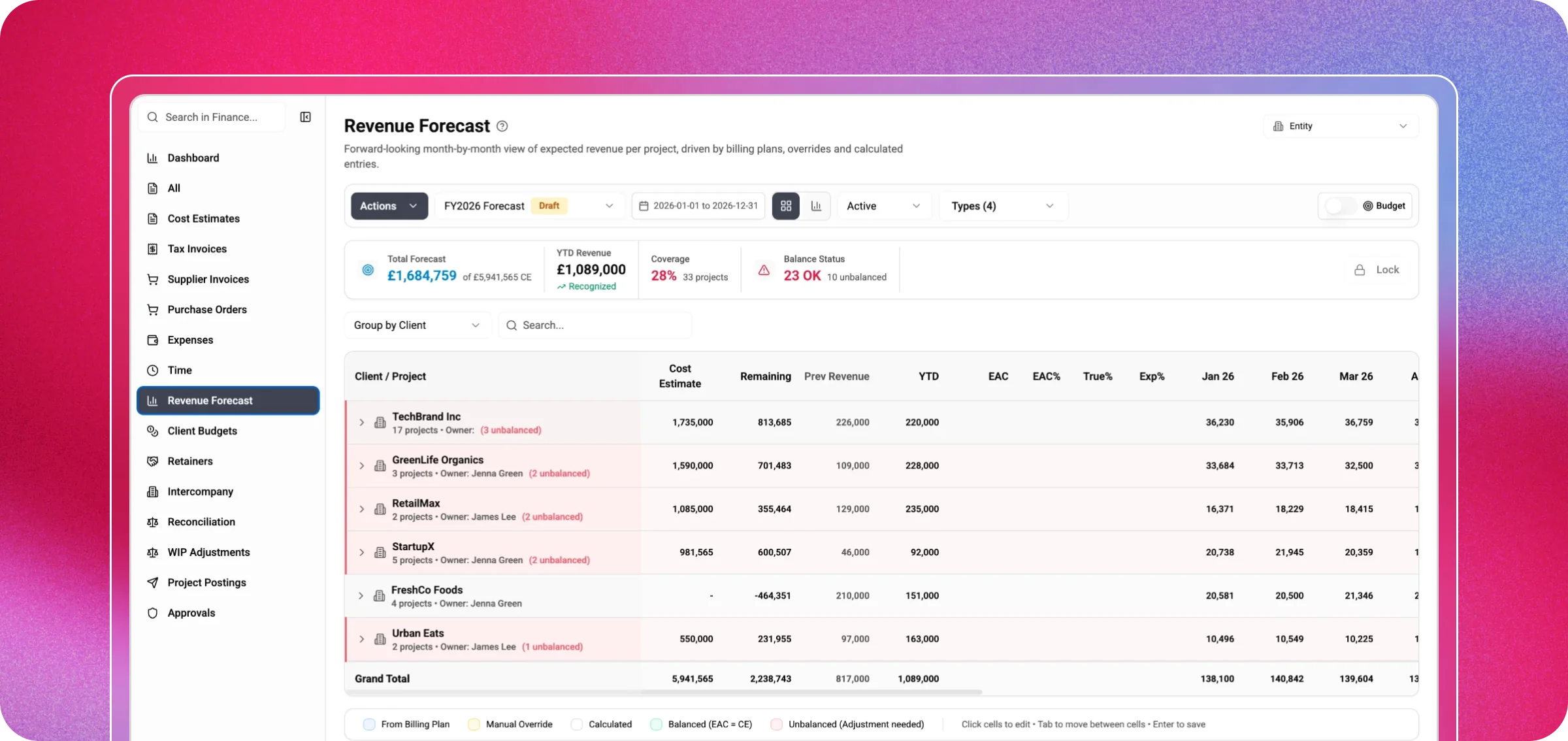
A dedicated revenue forecast
A month-by-month grid shows expected revenue for every project. Issued estimates fill and lock the months their stages are due, retainer revenue is calculated for you and issued invoices sit alongside the forecast. Lock a version for sign-off, start the next draft and compare the bottom-up forecast with annual Client budgets.
9. Insight on every screen
In the same 2019/20 survey, 30% of agencies listed not knowing which projects and Clients were profitable as one of their finance team's biggest challenges. The new Magnetic makes that question easy to answer.
Ready-made dashboards for capacity, over-servicing with estimate at completion, pipeline and forecasts, profitability, work in progress and revenue recognition, staff performance and company-wide metrics.
A pivot explorer with calculated fields, a report library, custom dashboards and Excel or CSV export.
Scheduled reports emailed to chosen recipients on your timetable.
A widget library: build a widget once, share it and let every viewer see only what their permissions allow.
My Hub: a start page for each person and role, with tasks, signals, notifications, favourites, calendar meetings and one approvals inbox.
10. Maggie: an AI colleague, not a chatbot
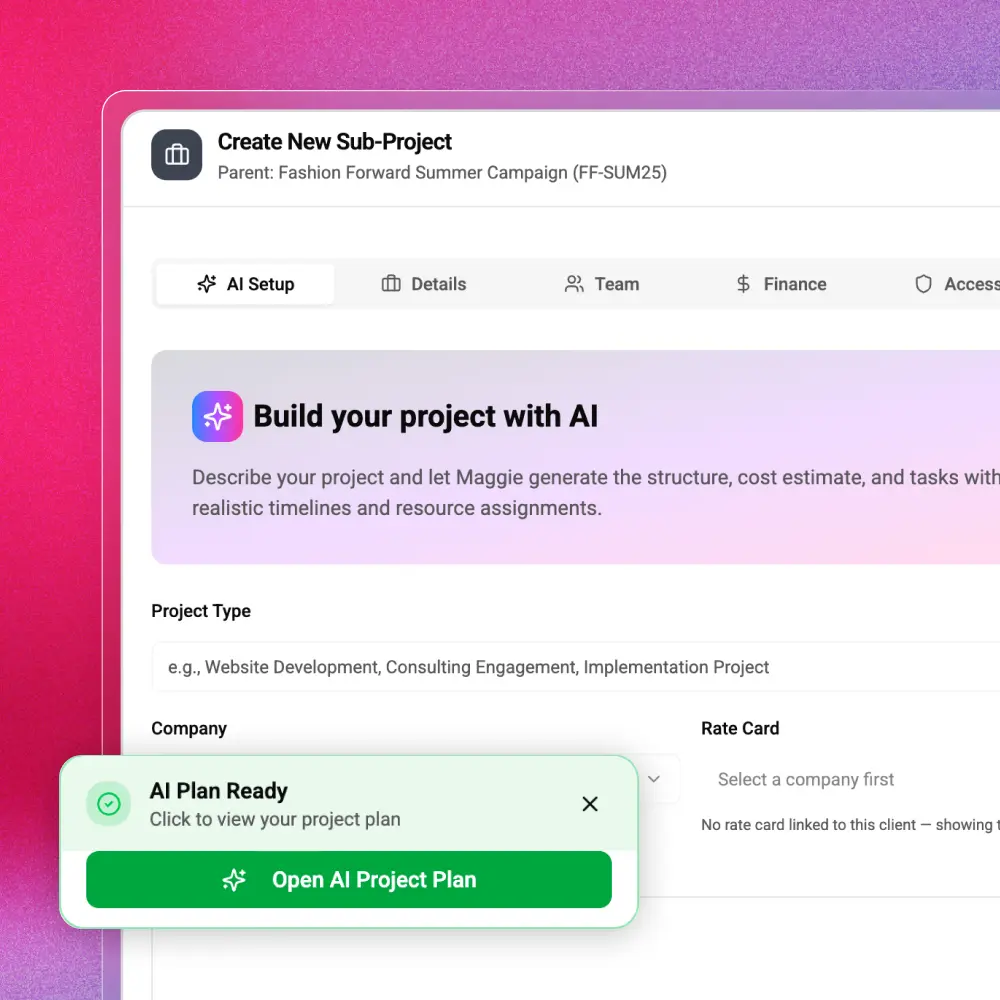
Describe the work, and Maggie drafts the project structure, cost estimate and tasks, with timelines and suggested people. But Maggie goes far beyond setup. In plain language, you can ask her to reschedule tasks, log or approve time, approve leave, edit a draft invoice, close a retainer period, lock an accounting period, propose revenue recognition, build a report or create a dashboard widget.
Ask which projects are over budget this month, and she answers using your firm's data, within your own permissions. Before saving anything, Maggie shows exactly what will change and waits for your confirmation, and the record's history marks it as 'via Maggie'. Some areas, such as business rules and people management, are deliberately off-limits to her.
Bring your own key: Maggie runs on your organisation's OpenAI or Anthropic (Claude) account, with a choice of current models.
Admins choose which access roles can use her.
Connect Claude, ChatGPT or other assistants to Magnetic data over MCP or Magnetic's API.
Building a project with Maggie: describe the work, review the draft, confirm.
11. Enterprise-grade foundations
Under the surface, the new Magnetic is built to the standard larger firms expect, and that smaller firms deserve.
Security: two-factor sign-in, trusted browsers, role-based permissions down to individual fields and secure, permission-checked file access.
Your own storage: keep uploaded files in your own SharePoint, OneDrive, or Azure Blob Storage, with a lower-cost archive location for archived projects.
People data in sync: connect BambooHR or Personio.
Your language: rename core terms to match how your firm communicates and set regional date and number formats per firm and per person.
Automation: a WHEN-IF-THEN builder, scheduled rules and business rules that set defaults for new records.
Built for phones and tablets, with the help centre inside the app, including a guide to what is new.
Moving from the Magnetic you know: a guide in the help centre lists what is new or improved, what each feature does and when it helps.
One system. Every part of your firm.
Sales, delivery, resource management, finance, and leadership can finally work from a single source of truth. No more tracking down updates across different tools or keeping spreadsheets up to date. In the new Magnetic, each stage builds on the last: opportunities become estimates, estimates turn into plans, plans lead to timesheets,
timesheets generate invoices, and invoices wrap up the month. It’s all connected and seamless, with Maggie there to help at every step.
We’ve taken Magnetic to a whole new level. Now, it’s your turn to explore what’s possible.
Book a 60-minute demo. See the new Magnetic in action, with your own workflows in mind 👉Book a demo
The biggest release in Magnetic's history connects winning work, planning, delivery, billing, and month-end in one platform, with an AI colleague working alongside everyone in your firm. This release rebuilds Magnetic, with a new interface and a new engine. Every area works from the same companies, projects and people, so a number means the same thing on every screen.
What is Maggie?
Describe the work, and Maggie drafts the project structure, cost estimate and tasks, with timelines and suggested people. In plain language, you can ask her to reschedule tasks, log or approve time, approve leave, edit a draft invoice, close a retainer period, lock an accounting period, propose revenue recognition, build a report or create a dashboard widget. Before anything is saved, Maggie shows exactly what will change, waits for your confirmation, and records the history as 'via Maggie'.
Which AI models does Maggie use?
Maggie runs on your organisation's OpenAI or Anthropic (Claude) account, with a choice of current models. Admins choose which access roles can use her.
Does the new Magnetic work with Microsoft Teams and Slack?
Link a project to a Teams or Slack channel or let Magnetic create a private channel with the project's Watchers as members. Comments, replies, emoji reactions, edits and deletions sync both ways, with replies nested in the right thread.
Which accounting systems does the new Magnetic connect to?
Xero, QuickBooks Online, Visma e-conomic, NetSuite and Microsoft Dynamics 365 Business Central, connected per billing entity, with payments flowing back.
Can we keep our files in our own Microsoft 365?
Yes. You can keep the files you upload in your own SharePoint, OneDrive or Azure Blob Storage, with a lower-cost archive location for archived projects.
Jenna Green
Head of Growth
at Magnetic
Jenna Green leads marketing at Magnetic. She's worked across agencies, startups, and B2B SaaS, giving her first-hand experience of the operational challenges service firms face.