US
US



Spreadsheets can still work for freelancers and very small teams with simple billing requirements. They become harder to manage as the number of people clients, billing rates and active projects increases. .
Manual entry increases the risk of missed or incorrectly logged hours, reducing billable revenue and creating more admin for managers.
Incomplete time data makes it harder to track project budgets, profitability, capacity, and the work delivered to clients.
Automated time tracking improves billing accuracy by connecting hours directly to the correct clients, projects and budgets.
The right approach depends on your team and reporting needs, but automation becomes more valuable as professional services firms grow.
Spreadsheets are a practical way for solo consultants and very small teams to track time, They become harder to manage when several people work across multiple clients, billing rates, retainers or fixed-fee projects. At that point, automated time tracking usually provides better control, because it captures time closer to when the work happens and connects those hours to project budgets, approvals and invoices.
Automation does not have to mean screen monitoring, It can be as simple as calendar-based suggestions, task times, pre-populated timesheets, submission reminders and approval workflows. The right choice depends less on heacount alone and more on how much commercial complexity your firm needs to manage.
This guide compares the two approaches for agencies, consultancies, accounting practices, engineering firms, architecture practices and other professional services businesses. The figures below come from publisher research and from Magnetic's own survey of 104 agencies. Where a number is a vendor estimate rather than a finding, it is labelled as one.
The important distinction is not manual versus digital. A spreadsheet is already digital. The difference is whether people must reconstruct and move the data themselves, or whether the system carries it through to budgeting, reporting and invoicing.
Time tracking is often treated as an invoicing task. In a professional services firm it also records the largest input cost on most client work: your team's time.
The data answers different questions for different commerical models.
Even firms that never show a timesheet to a client need reliable time data to cost future work, understand project cost and compare planned effort with actual delivery. Getting that comparison right is also the earliest warning that you have of scope creep, which shows up in the hours long before it shows up in a conversation.
The data is difficult to recreate at the end of a busy week. Microsoft's 2025 Work Trend Index, which pairs a survey of 31,000 workers with aggregated Microsoft 365 activity signals, found that employees are interrupted by a meeting, email or chat 275 times a day on average. In that working environment, a blank spreadsheet that depends on accurate recall places too much weight on memory.
There is a second problem, and it is one more firms never account for: the spreadsheet itself is less reliable than it feels.
Raymond Panko of the University of Hawai'i has spent three decades collecting empiricle research on spreadsheet accuracy. Summarising 85 intensive inspection studies of real operation spreadsheets, most conducted by commercial auditing firms, he reports that "collectively, these studies found errors in 94% of the spreadsheets studied." Across field audits where cell-level data was available, the average cell error rate was 5.2%
Per-cell error rates of a few percent sound tolerable, but errors compound along chains of calculation. A timesheet workbook with a hundred dependent formulas is overwhelmingly likely to contain atleast one wrong bottom-line number.
Panko's more uncomfortable finding is about confidence. People are consistently over confident in spreadsheets they have built themselves. The errors are not absent. They are invisible to the person best placed to find them. This is why "we would have noticed" is not a control.
None of this makes spreadsheets useless - it makes them untested software which is a manageable risk as long as you cost it honestly.
There is no operations prize for replacing a simple process with software before the need exists. A spreadsheet can work well when:
For a small firm, the flexibility is genuinely useful. You can build the exact columns you need, change the structure in minutes and avoid another subscription.
If you are staying on a spreadsheet, it should capture enough context to be useful later. At minimum:
Use controlled dropdown lists for clients, projects and work types. Protect the formula cells, keep one master version, define who is allowed to change project codes, and set a daily submission expectation. Those five controls address most of the errors usually blamed on spreadsheet as a category.
The spreadsheet itself is not usually the first thing to fail. The process around it becomes unmanageable as people, projects, rates and approval steps multiply.
When entries are completed at the end of the week, people reconstruct their week from calendars, sent emails, and memory. Small pieces of work are omitted, descriptions become vague and hours are more likely to be recorded on the wrong project. They usually get recorded on the largest one, because large jobs are memorable, which is precisely how small projects end up looking more profitable than they are.
The effect has been documents most precisely in legal services. Writing in the American Bar Association's Law Practice Magazine, Frederick J. Esposito Jr., Chief Operating Officer at Rivkin Radler LLP, states that "a one-week delay in time entry can result in losing up to 20% of billable time. After more than a week, the percentage of potential billable time lost increases to more than 50 percent."
Those figures describe law firms and should not be treated as a universal benchmark. The underlying mechanism remains the same: The longer the delay, the less reliable the record.
A project manager checks the codes, operations consolidates the files, finance applies the rates, and someone else prepares the invoice. Each handoff adds work and another change for the data to disagree with itself.
A spreadsheet can show budget performance, but only once every entry has been collected and the formulas refreshed. If that happens at month end, a fixed-fee project can consume far more hours than planned before the project manager sees the full position.
This is where the aggregate damage shows up. Billable utilisation across professional services fell to 66.4% in 2025, the lowest point in SPI research's surveying history and below the 70% threshold SPI treats as healthy, based on responses from 509 professional services organisations. Firms at the top of SPI's maturity scale run above 80%. That gap is not closed by working harder. Our survey found that 42% of agencies bill only 50-70% of their team's hours to clients, another 20% bill less than half, and 14% of agency leaders could not say what their billable ratio was at all.
If you want to see where your own recovery is falling short, our guide to reducing time leakage in professional services firms walk through the diagnosis client by client.
Different rates by person, role, client, project or work type require lookup tables and careful maintenance. Retainers, write-offs, non-billable work, and multi-currency billing add more dependencies. A formula can calculate all of it, but someone has to maintain that formula and test every change. Ask who that person is, then ask what happens when they leave.
Emailed files, copied tabs and overwritten cells make it hard to establish which data was approved and what changed afterwards. Access controls in Excel or Google Sheets help, but they do not amount to a professional services workflow on their own.
"automated time tracking" covers several quite different product types. The distinction matters, particularly where adoption and privacy are concerns.
The system uses calendar events, assigned tasks or recent activity to suggest entries. The person reviews, adjusts and submits. This reduces reliance on recall without removing human approval.
Someone starts and stops a time while working. The system records duration and links it to the selected client or project.
The software sends reminders for incomplete timesheets, routes submissions to a manager for approval, prevents changes after a period closes, and flags missing project information.
Each approved entry updates project actuals, utilisation reporting, budget consumption and invoice preparation. This is where automation earns more than faster data entry does.
Some products monitor applications, documents, browser activity or screens and drafts entries from it. It captures more details, but it demands careful thought about consent, data access, client confidentiality and employment law.
Not every firm needs passive monitoring. For most, calendar suggestions, timers, task-linked entry and reminders provide enough automation without recording screen activity.
Spreadsheets have a low software cost, and a higher total operating cost once admin, corrections and disconnected reporting are counted. Automated software reverses the pattern: the subscription is visible and the savings are spread thinly across several processes where nobody is measuring them.
Use your own data rather than a broad industry claim:
Unrecorded delivery value = billable team members x average unrecorded hours per person x blended billing rate
Monthly administration cost = hours spent preparing, checking and correcting time data x fully loaded hourly cost of the people doing it
Potential monthly benefit = realistically recoverable value + administration savings + avoided write-offs.
If 10 billable employees each fail to record 15 minutes per working day, that is 50 hours across a 20-day month. At a blended rate of £150, the unrecorded delivery value is £7,500.
That does not automatically mean the firm can invoice another £7,500. On time-and-materials work some of it is recoverable revenue. One fixed-fee work it is more likely to present as unmeasured project cost and thinner margin. On a retainer it may simply prove the account is consuming more capacity than the fee supports. The margin side of that calculation is covered in how to calculate true profit margin.
If your firm uses a mix of hourly, retainer and fixed-fee work, time needs to be connected to project budgets and billing rules. If you are still working out the right billable-hour targets, read our guide to mastering billable hours to understand how to set realistic targets for your team.
Your firm is probably read to test automated time tracking when several of these are true
No single sign forces a software purchase. Together they indicate the firm is already paying for the spreadsheet, in staff time and delayed information.
Feature count tells you very little. The product has to produce complete, useful time data with the least effort from the people entering it and the lease reconciliation afterwards.
A standalone time tracker is enough if the goal is to record hours and produce basic reports. It is quicker to implement and usually cheaper.
A professional services automation platform is the better fit when time must also update project budgets, resource plans, utilisation, profitability and invoices. The value comes from one data set serving delivery and finance, rather than hours being exported from one tool and reconciled in another.
A standalone time fixes time capture, but stops there. The hour is recorded accurately, and then it still has to be matched to a rate, checked against a budget and re-entered into an invoice, usually by finance working from an export. That is the same reconciliation the spreadsheet forced, moved one step downstream. The hour is not the deliverable. The invoice is.
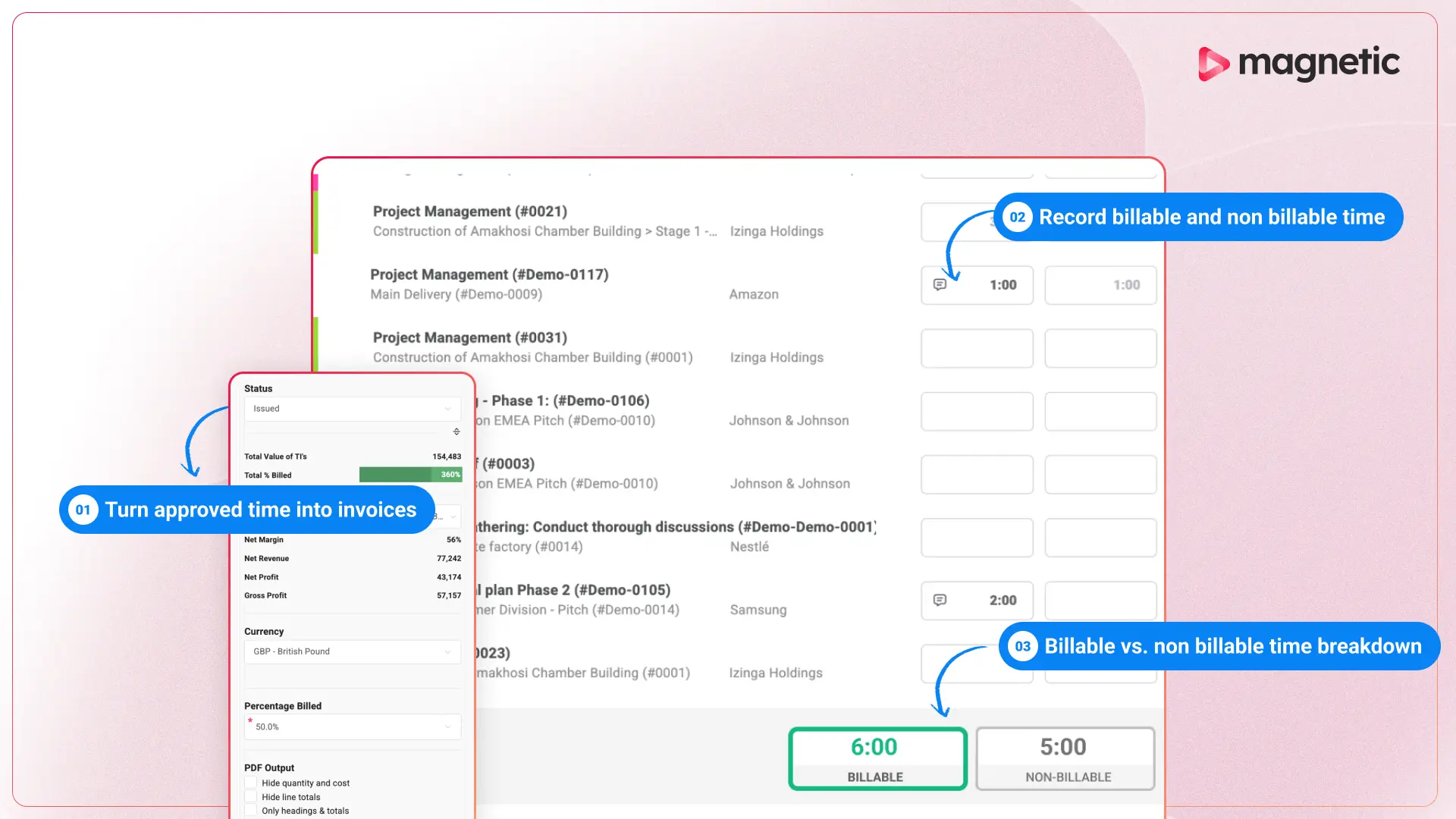
That is the distinction behind Magnetic's time tracking software. A time entry carries its client, project, task and billable status from the moment it is logged, and that single fact is what makes the rest of the chain work.
As Chapu Chartered Accountants grew to more than 60 people, manual time and expense tracking became difficult to manage. Staff spent too much time entering data, while errors and delays slowed down financial reporting and invoicing.
After moving to Magnetic, Chapu brought timesheets, expenses, resource planning and reporting into one system. The firm was up and running within a week and later reported a 70% improvement in efficiency, fewer manual errors and faster, more accurate invoicing.
Spreadsheets are not inherently inaccurate, and automated time tracking is not automatically effective. A disciplined small team can run a reliable spreadhseet. A badly configured platform can create as much friction as the process it replaced.
The case for software gets stronger the more jobs the data has to do. If one approved entry needs to update a project budget, support an invoice, explain utilisation and improve the next estimate, connecting those processes is worth the more than the license costs. If you are evaluating options, test them with real projects and your own rates. Magnetic offers a 14-day free trial, or you can book a guided demo to see how time, budgets and invoicing work together.
Start a free trial and see Magnetic with your own projects. No credit card required.
.svg)
Yes, for a solo consultant or small team with few projects and simple billing. A spreadsheet becomes less suitable when several people need controlled project codes, approvals, current budget reporting or a direct connection to invoicing.
The main ones are error exposure, retrospective capture and the absence of an audit trail. Audits of operational spreadsheets find errors in 94% of them, at an average cell error rate of 5.2%. Time is typically entered from memory days after the work, and a cell records a number but not who entered it, when, or against which task.
Consider replacing them when managers regularly need to follow up on missing entries, finance re-enters hours for billing, projects exceed planned effort before anyone notices, or utilisation and profitability reports require heavy manual consolidation. Billing complexity is a better trigger than headcount.
Yes! Time may not determine the client invoice, but the internal cost of delivery is still important. Comparing estimated time with actual hours is how a fixed-fee firm understands margin, spots over-servicing and prices the next job better.
Not necessarily. Many products rely on task timers, calendar events and employee-approved suggestions. Some offer passive activity capture. Choose a method that matches the operational need, and be transparent about what is collected, why, and who can see it.
Compare the subscription and implementation cost against three measurable areas: administration time saved, realistically recoverable billable work, and write-offs avoided through earlier visibility. Use a pilot and your own rates rather than a vendor-wide percentage.

Magnetic is an all-in-one workflow management platform designed and built for professional services firms.



.svg)