 Global




A services firm's finance stack has five layers: the ledger, project financials, planning, cash flow and reporting. Spend management and compliance platforms come later, if at all.
Your accounts tell you the firm made money last month. Only project-level data tells you which clients and projects made it, and which lost it.
Most finance teams still plan in spreadsheets. That works, as long as the spreadsheet runs on live project and pipeline numbers rather than last quarter's export.
Below about 50 people, Xero or QuickBooks plus a PSA connected to it covers most of what you need. An ERP earns its cost when you run several entities or currencies, or a few hundred staff.
In 2025 the average services project earned a 37.7% margin, yet billable utilisation fell to a record low of 66.4%. Margin goes missing between the project and the P&L, and most finance stacks have no tool watching that stretch.
For a CFO at a services firm, having the right financial management tools is essential. Here’s what matters most:
1. Accounting software that makes month-end less painful
2. A project finance layer that connects worked hours to invoices and profit
3. Reliable planning tools that help you accurately budget and forecast
4. Cash flow visibility that tells you when money’s coming in or going out
5. Reporting that brings all the numbers together in a way people actually use
Most lists of CFO tools cover four of those. They miss project finance, which determines whether a services firm makes money, because your highest cost is your people's time, and the ledger sees that time only as salary.
The tools you need depend more on your size than your sector. A 25-person agency and a 300-person consultancy need the same answers from their numbers, but very different software to get them, so each layer below says what to buy and what to skip. For more detail on the planning layer, see our guide to budgeting and forecasting tools for professional services.
Strip the job back, and a services firm's finance stack exists to answer four questions:
Reporting sits across all four. It's how the answers reach a partners' meeting without someone spending two days in Excel first.
A product company can answer the second question from its accounts, because the cost of what it sells is attached to each sale. You can't. Your cost of delivery is salaries, and salaries hit the books as one line per person per month, whichever client that person spent the month on. Unless you record time against projects and cost it, your accounts can't tell a profitable retainer from one where you've been absorbing extra costs for months. This challenge is also why the most critical tool in your stack is the one left out of most generic CFO tool lists.
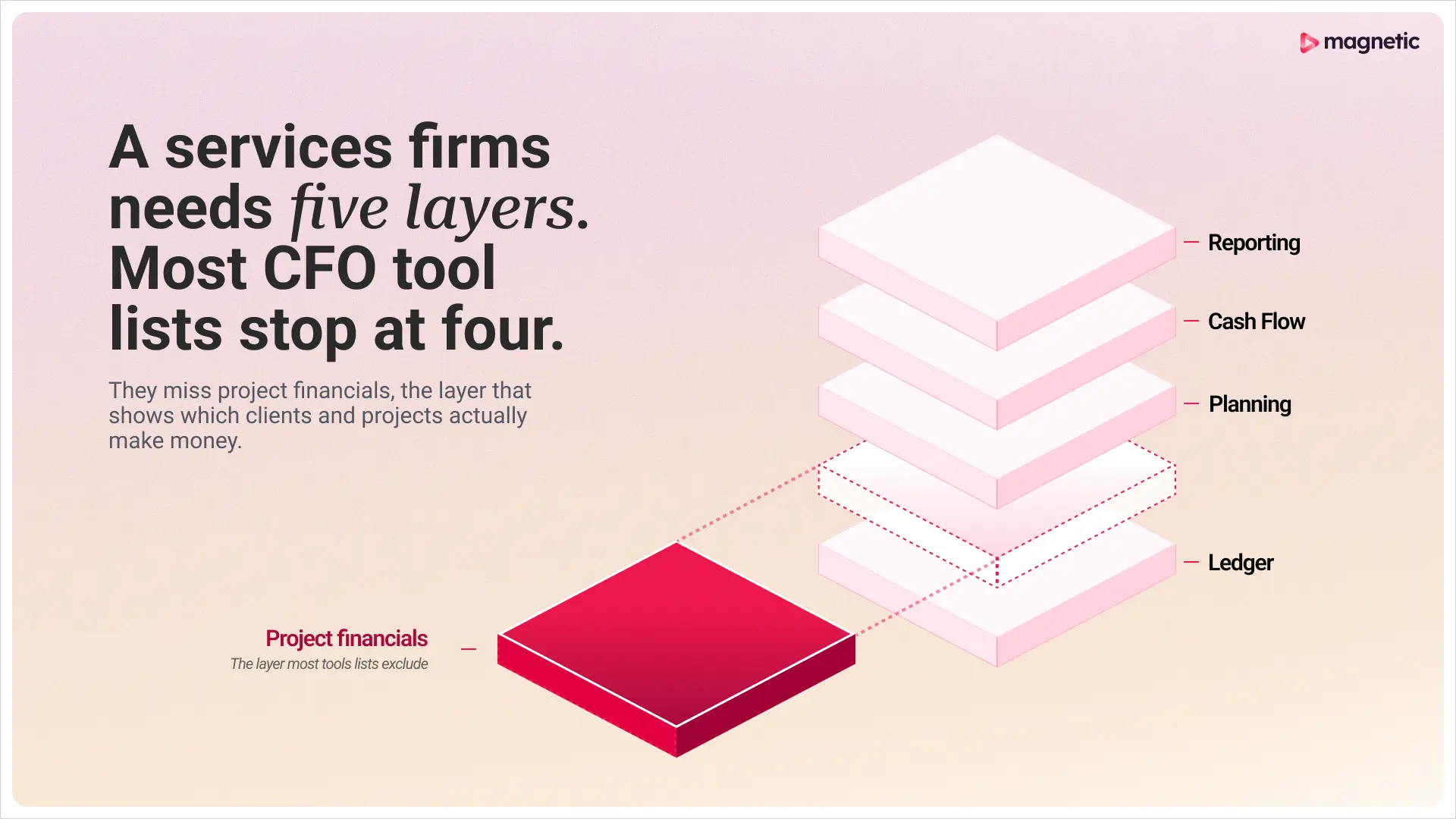
Every firm starts here. Accounting software handles the general ledger, invoices and bills, payroll journals, VAT or sales tax, and the statutory accounts. It's the record your auditor and the tax authority rely on, and nothing else in the stack should try to replace it.
The names you'll come across most:
Do you need an ERP? Fewer firms do than ERP vendors would like. In the same survey, 29% of companies ran without one, and 38% of those under 50 employees did. An ERP pays for itself when you have several legal entities, several currencies, or enough staff that consolidation and financial controls need a team of their own. Below that, the cost and the months of implementation buy you very little that a well-connected accounting system can't.
Whichever you run, make sure it accepts invoices from the system your team records time in. Nobody should have to regenerate invoices at month-end.
Search for CFO tools, and you'll find lists of 20 or 35 products, sorted into accounting, ERP, FP&A, spend management, payroll and BI. They're written for companies that sell software or physical products. None of them includes the tool a services firm's margin depends on, because in those businesses margin isn't decided project by project.
In yours, it is. Margin is set when the work is scoped and priced, then won or lost week by week as the team delivers it. Here's where it leaks:
Your accounts won't flag any of these issues right away. Instead, you'll only notice months later, when margins are lower than expected, and there's no clear trail back to the project that caused the shortfall.
The gap is bigger than the accounts suggest. In 2025, the average services project earned a 37.7% margin, a five-year high, yet billable utilisation fell to 66.4%, the lowest in 19 years of SPI Research data, and the average project overran its budget by 10.7%. Firms are pricing their work well and losing it in delivery.
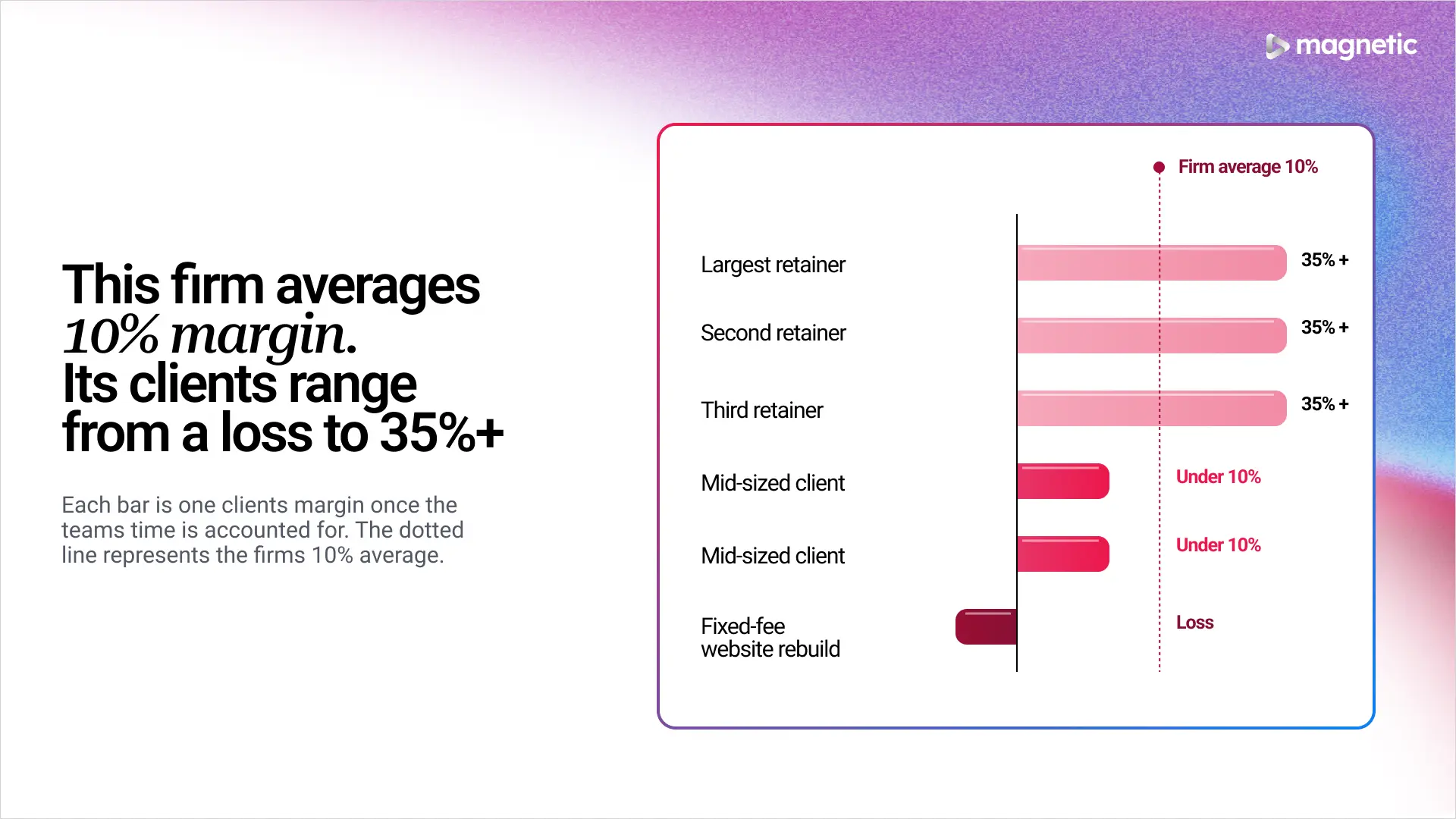
Here's a hypothetical to show how that hides. A 40-person agency bills £4 million a year and closes the year at a 10% net margin. Nothing in the management accounts looks wrong. Now cost the team's time against each client. The three largest retainers each earn 35% or more. Two mid-sized clients earn under 10% once you count their hours. One fixed-fee website rebuild lost money outright. The firm's average looks healthy, and the mix underneath it doesn't, and only the project layer shows you which clients to reprice, rescope, or let go.
The tool for this layer is professional services automation (PSA) software. A PSA records time against projects and tasks, applies cost and bill rates, tracks budget against actuals, holds work in progress (WIP), raises invoices from approved time and milestones, and reports margin by project, client, and service line. It then passes the invoices to your accounting software. The ledger stays the ledger. The PSA tells you what's behind the numbers.
When you compare PSA tools, look for:
If you want the arithmetic behind those numbers, our guides cover calculating true project margin, utilisation versus realisation and managing work in progress.
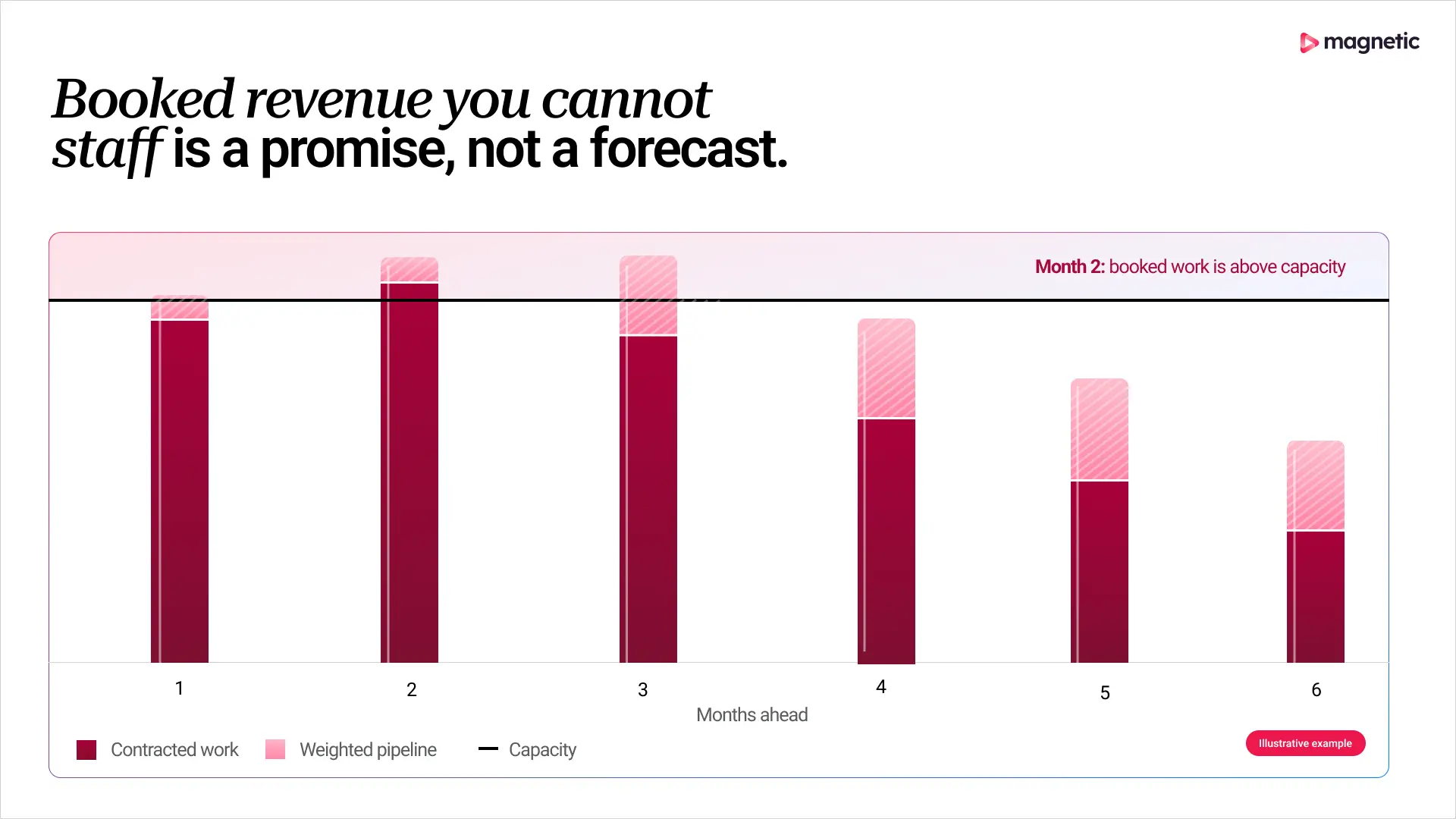
Planning tools build the annual budget, the rolling forecast and the scenarios you'll be asked for: what happens to margin if we hire three people in March, or if our biggest client cuts its retainer by half.
Most finance teams still do this in spreadsheets. In CFO Connect's survey, 61% of finance leaders named spreadsheets as their main planning tool, and 68% at companies under 50 people. Dedicated FP&A platforms such as Workday Adaptive Planning, Vena, Planful and Pigment take over as firms add entities, budget holders and board reporting.
For a services firm, what feeds the plan matters more than the tool you build it in. Your revenue forecast isn't last year plus a growth percentage. It's three things added together:
A spreadsheet built on those three live inputs is more useful than an FP&A platform fed by last quarter's export. Our hub guide compares the planning platforms side by side and shows where firm-level FP&A ends and project forecasting begins.
Services firms run on a timing mismatch. Payroll goes out like clockwork every month. Fees, on the other hand, only come in when milestones are signed off, retainers are invoiced, and clients finally pay. A profitable firm can still run short for a month because two large invoices land late.
Cash flow tools forecast your bank balance week by week from receivables, payables, and scheduled costs. Float, for example, builds its forecast from Xero or QuickBooks data. Larger firms may already have cash forecasting in their ERP, or use a dedicated treasury tool.
A forecast is only as reliable as the billing schedule it’s built on. Three numbers matter more than anything else:
Our guide to cash flow forecasting for professional services firms works through a five-step process with an example.
Reporting gets these numbers into the hands of people who can use them. Most firms start with the reports built into their accounting and project tools, and add a business intelligence (BI) tool once they need to combine data from several systems. Microsoft Power BI is the most widely used, at 22% of finance teams in CFO Connect's survey, ahead of Looker and Tableau.
Check whether you need one before you buy. If your project and finance data already sit in one system, its own reporting dashboards will cover weekly use. BI earns its place when you're joining three or more sources, or when the board wants a view nobody's system produces. Either way, our piece on real-time profitability dashboards sets out what a services firm's weekly view should contain.
Most CFO tool lists focus heavily on spend management and compliance software. The reality is, unless your firm is a few hundred people or more, you probably don’t need most of those compliance platforms. For most professional services businesses, compliance means keeping up with statutory accounts, taxes, and payroll, things your accountant and accounting software already cover. The rest comes down to the terms you set in your client contracts.
Tools like Expensify and Spendesk are useful when your team spends heavily on travel or often needs to bill expenses back to clients. If so, make sure every expense is tied to the right project, not just entered in the ledger. Otherwise, you’ll cover that expense out of your own margin instead of passing it on to the client.
These columns are just a starting point. For example, a 40-person consultancy with teams in several countries might need an ERP well before a bigger agency based in a single city. And if your partners are still reviewing every invoice themselves, a PSA could be the first thing you need, even ahead of anything else on this list.
Magnetic is the project finance layer. It isn’t accounting software and doesn’t try to be. Your team tracks time against projects and tasks, and Magnetic handles rates, compares budget to actuals, flags over-servicing, tracks work in progress and unbilled revenue, and generates invoices from approved time and milestones. Invoices, credit notes, and supplier invoices then sync to Xero, QuickBooks, Sage or Pastel, so your ledger stays the single record for tax and audit. Revenue forecasting draws on the CRM pipeline and the resource plan, so the forecast and the staffing plan come from the same data.
You can see the finance side on our finance management page, and what it looks like day to day for finance managers. It all starts with timesheets logged against the work, because every margin figure downstream depends on them.
Exonic Solutions, a firm of under 50 people, moved its project and finance work onto Magnetic from several separate tools and reports, achieving 80% better project visibility and 45% less time spent on admin. As Billy Einkamerer, Managing Director, put it: "Magnetic has helped us replace the noise of multiple tools with a single, reliable system that actually supports how we work."
Not sure where to start? Focus on question two: pick your five biggest clients from last quarter and figure out what you actually earned on each, factoring in your team’s time. If that’s a quick job, your systems are probably working well. But if it takes days to pull together, it’s a sign you’re missing the right project-level tools, and we can show you how Magnetic can help.

No. ITFM tools such as Apptio manage a company's technology spend: cloud and software costs, IT budgets, and charging those costs back to departments. They're built for CIOs and IT finance teams. The tools in this guide run the finances of a firm that sells its people's time.
Accounting software records what has happened: invoices, bills, payroll, tax, and the statutory accounts. Financial management software adds what the ledger can't show, such as project and client margins, forecasts, cash projections, and scenarios. In a services firm, most of that extra view comes from project data, so a PSA and a planning tool sit alongside your accounting software rather than replacing it.
Usually not. In CFO Connect's 2025 survey, 38% of companies under 50 employees ran without one. Accounting software plus a PSA covers the ledger and project finance for most small agencies. Look again when you add legal entities or currencies, or when month-end consolidation starts taking more than a few days.
An ERP runs the back office: the ledger, purchasing, consolidation and, in larger systems, HR and supply chain. A PSA runs the delivery side of a services business: projects, time, resourcing, billing and project margin. Some ERPs include a professional services module. If you're on Xero, QuickBooks or Sage, a PSA connected to them gives you the delivery side without an ERP project. Our guide to professional services automation explains what a PSA covers.
Mostly general-purpose assistants. In CFO Connect's survey, 56% of finance leaders used AI tools in 2025, up from 31% in 2024 and 17% in 2023, with ChatGPT the most named. An assistant can only explain a margin drop if it can read the data behind it, which is another reason to keep time, invoices, and forecasts in connected systems.
Margin by project and client, billable utilisation, unbilled WIP, cash against forecast, and pipeline against the revenue target. Together, they show whether this month's work is making money and whether next month's will. Our list of five metrics to watch weekly covers how to read each one.
René Praestholm
Chief Executive Officer
at Magnetic
25+ years in professional services software. Former COO of Workbook Software (15 years) and VP of Global Agency Solutions at Deltek. One of the most experienced leaders in the PSA Software category


Magnetic is an all-in-one workflow management platform designed and built for professional services firms.