 GlobalGlobal

ClickUp has firmly established itself as one of the most flexible work management platforms available. Its core promise - to consolidate tasks, docs, dashboards and automations into one system, continues to appeal to teams that want maximum configurability.
For many organisations, ClickUp still works extremely well. However in 2026, teams are no longer choosing tools based purely on feature breadth. The conversation has shifted toward fit, clarity and operational impact.
Across industries, several macro changes are shaping how teams think about work management:
As a result of evolving needs, many teams are exploring ClickUp alternatives:
Some teams want:
This has driven the rise of purpose-built work management platforms - each optimised for a particular way of working, rather than every possible one.
This guide covers 7 over the strongest ClickUp alternatives in 2026 with emphasis on:
Rather than comparing tools purely on feature lists, we evaluated each platform through the lens of real operational use.
We looked beyond pricing to understand:
Every tools in this list supports task management. We focused on:
Power is only valuable if teams can use it.
We assessed:
Modern teams operate across multiple systems.
We considered:
A two person startup, an internal ops team and a 60-person agency have fundamentally different requirements. Each tool was evaluated in that context. Teams focused on client delivery or creative work need platforms that keep collaboration and project management at the center. While software development teams often needs tools that support agile workflows.
Magnetic is designed specifically for professional services firms - agencies, consultancies and service-led businesses where work, time and people are core to the business.
While many work management tools focus primarily on tasks, Magnetic focuses on delivery systems. Projects are not just containers for tasks, they are living units connected to resourcing, time tracking, budgets and delivery health.
This makes Magnetic well suited to teams where success depends on how work is delivered, not just whether tasks are completed.
Magnetic structures work around real client engagements. Projects are designed to reflect scope, ownership, milestones and delivery expectations and not just abstract task trees.
This helps teams manage:
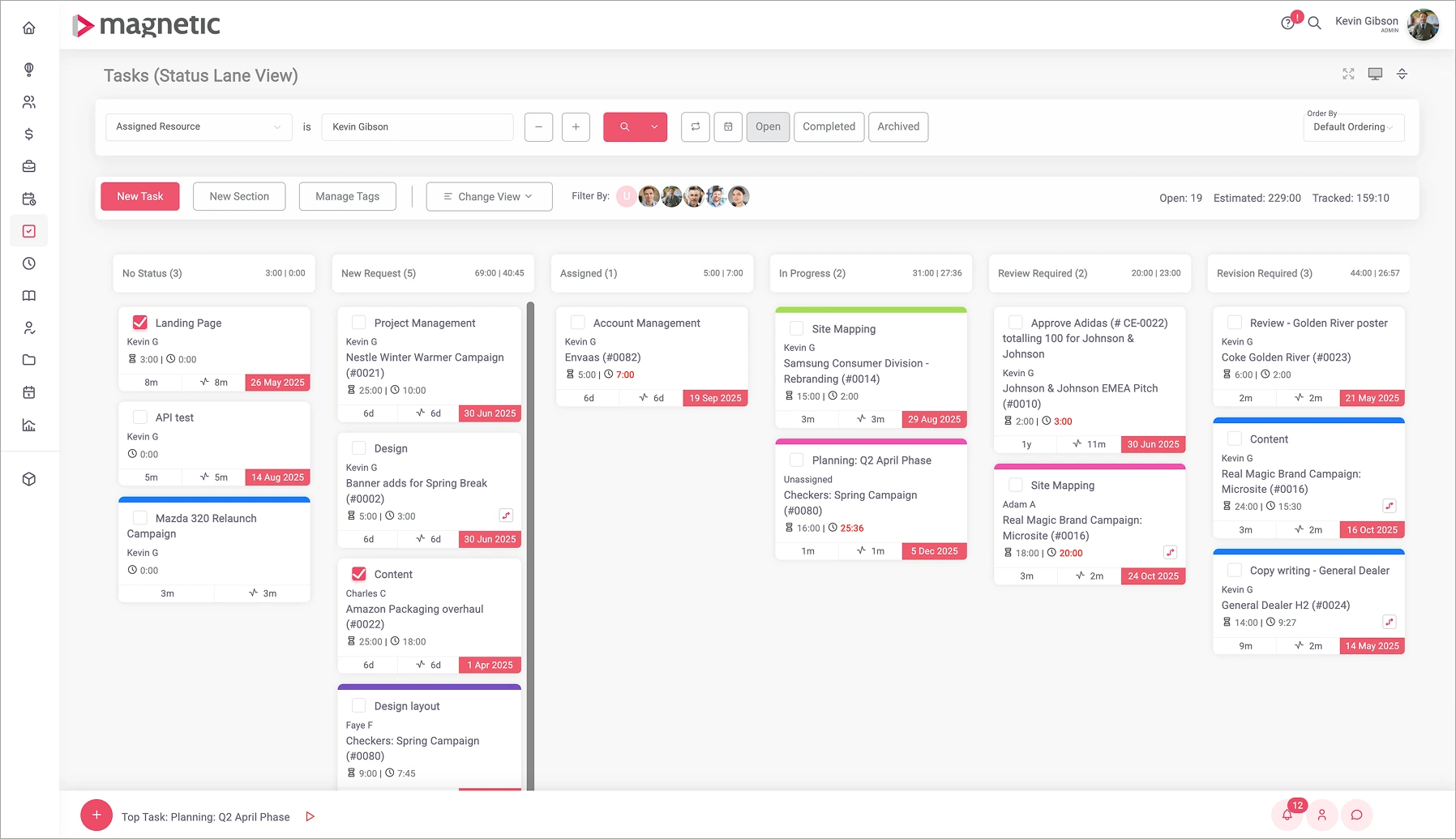
Time tracking is native and not an add on. Teams log hours directly against projects and tasks with automated timesheets and approval flows, reducing admin overhead.
This improves:
Magnetic gives teams a clear view of:
This allows managers to plan proactively rather than reacting when delivery is already under pressure.
Rather than treating financials as a separate system, Magnetic links delivery activity directly to budgets and forecasts.
Teams can see:
Many professional service firms use a combination of:
Magnetic brings all of this into a single connected system, removing the need for fragmented, disconnected tools.
Magnetic is commonly used by:
Teams rely on Magnetic to answer questions like:
Asana is known for its clarity and consistency. It provides a structured environment for team co-ordinating work across departments, with clearly defined ownership and timeslines.
Asana is widely used by:
Cross-functional team that want structure without heavy configuration
monday.com is built around visual boards and dashboards that make progress easy to understand at a glance
Teams that want visual oversight and configurable workflows
Trello's Kanban-based approach makes it one of the most approachable tools available.
Small teams, freelancers and lightweight workflows.
Notion approaches work management from a knowledge-first perspective, allowing teams to build highly customised systems.
Content, design, research and product teams
Smartsheet extends the spreadsheet model into a collaborative platform.
Finance, HR and operations teams.
Teamwork is purpose-built for client services, combining project management with time tracking and client access.
Agencies and billable teams
Choosing the right platform is about fit, and not features alone.
Ask:
Switching tools doesn't have to be distruptive. Many teams use migration as an opportunity to simpliy workflows and remove legacy complexity.
Magnetic supports teams moving from ClickUp by helping preserve data, redesign workflows intentionally and onboard teams quickly, ensuring the new system works from day one.
Start a free trial and see Magnetic with your own projects. No credit card required.
.svg)
The best ClickUp alternative in 2026 depends on your team's structure and workflow and the outcomes you need from a work management platform. Teams focused on cross-functional collaboration tend to select tools like Asana and monday.com, while agencies and professional service businesses tend to prefer platforms like Magnetic that connect project management with time tracking, resourcing and delivery.
When choosing a ClickUp alternative, teams should look beyond feature lists and focus on fit. Key considerations include how work is delivered (internal vs. client-facing), whether time and resourcing visibility is important, how much configuration the team can realistically maintain ad how quickly new team members need to get up to speed. The most effective platform is one that supports everyday workflows without adding unnecessary complexity.
Agencies and professional service firms often benefit from tools designed around delivery rather than task volume alone. Platforms like Magnetic and Teamwork are commonly chosen because they combine project management with time tracking, workload

Magnetic is an all-in-one workflow management platform designed and built for professional services firms.

.svg)